How to Analyze Survey Results and Reports

TL;DR

Written by waviness3324

11 min read

Survey Analysis Made Simple: Your Quick Start Guide

Analyzing survey results doesn't have to be complicated. Start by cleaning your data to remove duplicates and incomplete responses. Then tackle quantitative questions first calculate percentages, averages, and use cross-tabulation to compare different groups. Next, dive into qualitative responses by identifying recurring themes and tagging common issues. Visualize your findings with charts and graphs to make patterns obvious. Always compare results to previous surveys or industry benchmarks for context. Finally, turn insights into specific action items with owners and deadlines. Remember: good analysis leads to decisions, not just reports.

Content

You spent days crafting the perfect survey. You sent it out, people responded, and now you have hundreds or even thousands of responses sitting in a spreadsheet. Great. But what do you actually do with all that data?

This is where most people get stuck. Looking at raw survey data can feel overwhelming, especially when you have a mix of multiple choice answers, rating scales, and open-ended comments. The good news is that analyzing survey results does not require a PhD in statistics. It just requires a clear process and some practical techniques to turn responses into insights you can actually use.

This guide walks you through exactly how to analyze survey results and reports, step by step, in plain English.

Start By Cleaning Your Data

Before you dive into analysis, you need to clean up your data. This sounds boring, but it saves you from making decisions based on messy or incomplete information.

Here is what cleaning your data actually means:

  • Remove duplicate responses. Sometimes people submit a survey twice by accident. Look for identical timestamps or email addresses and delete the extras.
  • Filter out incomplete responses. If someone answered only one question out of ten, their response probably will not give you useful information. Most survey tools let you set a completion threshold, like requiring at least 80% of questions answered.
  • Standardize text responses. If you asked for job titles and got “Manager,” “manager,” and “Mgr,” treat those as the same response. Same goes for typos and abbreviations.
  • Check for suspicious patterns. If someone selected the same answer for every single question or filled open-ended fields with gibberish, remove those responses.

Some platforms like SurveyMonkey have built-in data quality features that flag duplicate or suspicious responses automatically, which can save you time during this stage.

Once your data is clean, you are ready to actually analyze it.

Calculate Your Response Rate First

Before you look at what people said, figure out how many people responded. Your response rate tells you how much you can trust your results.

The formula is simple:

Response Rate = (Number of Completed Surveys / Number of People Invited) × 100

For example, if you sent your survey to 500 people and 150 completed it, your response rate is 30%.

Why does this matter? A low response rate means your results might not represent your whole audience. If only 10% of customers responded, you are probably hearing mostly from people with strong opinions (either very happy or very unhappy). A response rate above 30% is generally solid for most surveys.

If your rate is low, note that in your report. It does not mean your data is useless, but it does mean you should be careful about making big decisions based on it.

Group Your Questions By Type

Not all survey questions are created equal, and you cannot analyze them all the same way.

Break your questions into these categories:

Quantitative Questions

These give you numbers and percentages. They include:

  • Multiple choice questions (What is your age range?)
  • Rating scales (How satisfied are you from 1 to 5?)
  • Yes/No questions
  • Ranking questions (Rank these features by importance)

You can count, average, and compare quantitative data easily. This is where you get clear stats like “65% of respondents prefer option A.”

Qualitative Questions

These give you words, stories, and explanations. They include:

  • Open-ended text boxes (What could we improve?)
  • Comment fields
  • “Why did you choose that?” follow-ups

Qualitative data takes more time to analyze because you have to read through responses and look for patterns. But it often gives you the why behind the numbers, which is gold.

Sorting your questions this way helps you pick the right analysis method for each one.

Analyze Quantitative Data First

Start with your number-based questions because they are faster to process and give you the big picture.

Look At Frequency And Percentages

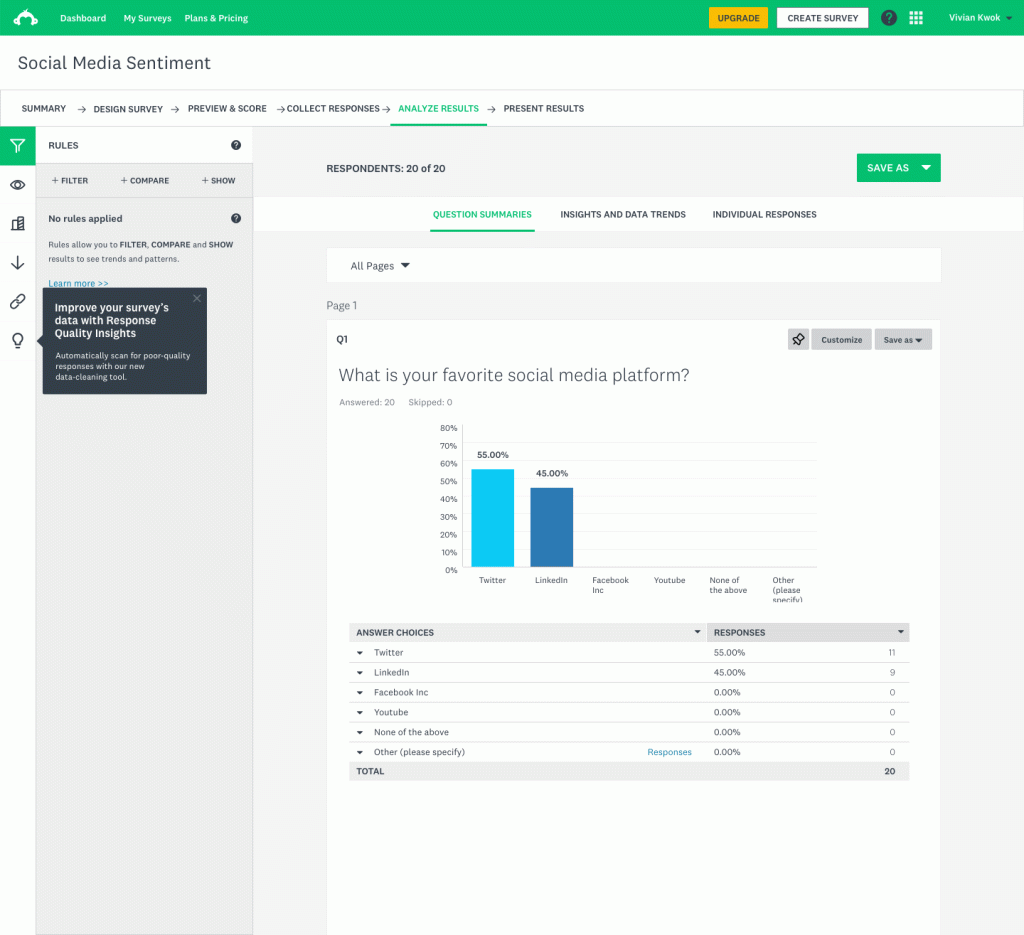
For multiple choice questions, count how many people picked each option and turn that into a percentage.

For example, if you asked “How did you hear about us?” and got 200 responses:

  • 80 people said social media (40%)
  • 60 said word of mouth (30%)
  • 40 said search engines (20%)
  • 20 said other (10%)

This is your most basic form of analysis, but it tells you a lot. You can immediately see that social media and referrals are your top sources.

Calculate Averages For Rating Scales

If you used a 1-5 scale (like “How satisfied are you with our service?”), calculate the average score.

Add up all the ratings and divide by the number of responses. If you got 100 responses with a total of 420 points, your average satisfaction score is 4.2 out of 5.

But do not stop at the average. Also look at how many people gave you a 5 versus a 1. Sometimes an average of 3.5 could mean most people are neutral, or it could mean half your customers love you and half hate you. Those are very different situations.

Use Cross-Tabulation To Dig Deeper

Cross-tabulation (or crosstab) means comparing answers across different groups. This is where you start finding interesting patterns.

For example, you might discover that:

  • Customers under 30 rate your mobile app higher than customers over 50
  • People who bought product A are more likely to recommend you than people who bought product B
  • Urban customers have different priorities than rural customers

Tools like ProProfs Survey make it easy to filter responses by demographics or behavior, so you can spot these differences without building complicated spreadsheets.

Cross-tabulation helps you move from “what happened” to “what happened for different groups,” which makes your insights way more actionable.

Tackle Qualitative Data Next

Open-ended responses take more effort, but they give you context that numbers cannot.

Read Through Everything First

Start by reading a sample of responses to get a feel for what people are saying. You are not analyzing yet, just getting familiar with the tone and types of comments.

Look For Recurring Themes

As you read, you will notice certain words, phrases, or complaints popping up again and again. These are your themes.

For example, in feedback about a software product, you might see themes like:

  • “The interface is confusing”
  • “Loading times are slow”
  • “Great customer support”
  • “Needs mobile app”

Create a list of themes, then go back through all the responses and tag each one with the relevant themes. You can do this manually or use text analysis features in your survey tool.

Count Theme Frequency

Once you have tagged everything, count how often each theme appears. If 45 out of 150 open-ended responses mention slow loading times, that is a clear priority to address.

Pull Out Powerful Quotes

Find a few responses that capture each theme perfectly. These quotes bring your data to life when you present your findings. Numbers tell you what the problem is. Quotes show you how people feel about it.

For instance:

“I love the product, but honestly I almost gave up during setup because I could not figure out where to start.”

That one sentence makes your data feel real and urgent.

Visualize Your Findings

Numbers in a spreadsheet are hard to digest. Turning them into charts and graphs makes patterns obvious at a glance.

Choose The Right Chart Type

  • Bar charts work great for comparing categories (like which feature is most popular)
  • Pie charts show proportions (like what percentage uses each plan type)
  • Line graphs track changes over time (like satisfaction scores month by month)
  • Word clouds highlight the most common terms in open-ended responses

Most survey platforms generate basic charts automatically. If you need more control, you can export your data to Google Sheets or Excel and build custom visuals.

Platforms like Survicate offer strong visual reporting features that let you create dashboards, making it easier to share insights with your team without exporting data.

Keep Visuals Simple

Do not cram too much information into one chart. If you have ten response options, consider grouping smaller categories together or showing just the top five.

Label everything clearly. Your chart should make sense to someone who did not run the survey.

Compare Results To Benchmarks

Data means more when you have something to compare it to. Benchmarks give you context.

Compare To Previous Surveys

If you run the same survey every quarter or year, compare the new results to past results. Are scores going up or down? Are different themes emerging?

Tracking trends over time helps you see whether changes you made actually worked.

Compare To Industry Standards

Some metrics have known benchmarks. For example, the average Net Promoter Score varies by industry. SaaS companies often aim for an NPS above 30, while retail might target 50 or higher.

If your score is below industry average, you know you have work to do. If it is above, you know you are doing something right.

Compare Across Segments

Even within your own data, compare different customer segments. How do new customers rate you compared to long-term customers? How do different age groups or regions differ?

These comparisons reveal where you are strong and where specific groups need more attention.

Turn Insights Into Action Items

Analysis is pointless if it just sits in a report nobody reads. The goal is to turn insights into decisions and actions.

Prioritize Based On Impact And Frequency

Not every piece of feedback deserves immediate attention. Focus on issues that:

  • Affect a large percentage of respondents
  • Have a big impact on satisfaction or outcomes
  • Align with your business goals

If 60% of customers mention a specific pain point, that is a top priority. If only 3% mention something, it might be a nice-to-have for later.

Create Specific Recommendations

Vague insights lead to vague actions. Instead of saying “customers want better support,” say “implement live chat during business hours and add a searchable help center.”

Be specific about what should change, who should own it, and what success looks like.

Assign Owners And Deadlines

For each recommendation, assign someone to take action and set a realistic timeline. Without ownership and deadlines, insights turn into forgotten suggestions.

Write A Clear Report

Your analysis is not done until you share it with the people who need to see it.

Structure Your Report Simply

A good survey report includes:

  1. Executive summary: One page with key findings and top recommendations
  2. Methodology: Who you surveyed, how many responded, when you ran it
  3. Key findings: The most important insights, with supporting charts
  4. Detailed results: Deeper breakdowns by question or segment
  5. Recommendations: Specific next steps with owners and timelines

Start with the summary so busy stakeholders can get the highlights without reading the whole thing.

Use Both Numbers And Stories

Include quantitative data (percentages, averages, charts) and qualitative data (themes, quotes, examples). Numbers show the scale of an issue. Stories show the human side.

Make It Scannable

Use headings, bullet points, and bold text to break up information. Most people skim reports, so make the important stuff easy to find.

Avoid jargon. Write like you are explaining the results to a colleague over coffee, not writing an academic paper.

Keep Improving Your Process

Every survey you analyze teaches you something about how to do it better next time.

Track What Worked

After you implement changes based on survey results, measure whether things actually improved. Did customer satisfaction go up? Did complaints about a specific issue decrease?

This closes the loop and shows whether your analysis led to real impact.

Refine Your Questions

If a question did not give you useful data, rewrite it or cut it next time. If an open-ended question got 200 thoughtful responses, keep it and maybe add similar ones.

Your survey should evolve based on what you learn from analyzing the results.

Build Templates

Once you figure out a reporting format that works, save it as a template. This makes future surveys faster to analyze and easier to compare over time.

Create a standard process for cleaning data, analyzing responses, and presenting findings so you are not starting from scratch each time.

Common Mistakes To Avoid

Even experienced people mess up survey analysis sometimes. Watch out for these traps:

  1. Ignoring the response rate. If only 5% of people responded, your data probably does not represent everyone. Acknowledge this limitation.
  2. Cherry-picking data. Do not just highlight results that support what you wanted to hear. Report the good and the bad.
  3. Over-complicating the analysis. You do not need fancy statistical tests for most surveys. Simple percentages and averages usually tell the story.
  4. Forgetting to act on results. Analysis without action is wasted effort. Make sure insights lead to real changes.
  5. Not sharing results with respondents. If you asked people for feedback, let them know what you learned and what you are doing about it. This builds trust for future surveys.

Wrapping It Up

Analyzing survey results is not about being perfect or using complex formulas. It is about being methodical, looking for patterns, and turning responses into insights that help you make better decisions.

Start with clean data, break your questions into types, analyze quantitative data for the big picture, dig into qualitative data for the details, visualize everything clearly, and always connect your findings to specific actions.

The more you do this, the faster and better you will get at spotting what matters and turning feedback into improvements that your customers or team will actually notice.

Comments

Leave a Comment