Let’s be honest: tracking your cost-per-lead feels like playing a high-stakes game where the rules change every single Tuesday. You roll out a flashy ad campaign, watch the metrics spin in your dashboard, and start celebrating because you’re pulling in leads for twenty bucks a pop. But then you pass those names over to your sales team. A week later, they come back empty-handed and completely frustrated. Half the phone numbers are disconnected, the other half have zero intention of buying, and that cheap cost-per-lead metric suddenly looks like an expensive waste of your marketing budget.
The truth is, tracking raw lead volume is a vanity trap. If you want to protect your profit margins and scale your pipeline predictably, you need to stare directly at your Cost Per Qualified Lead (CPQL).
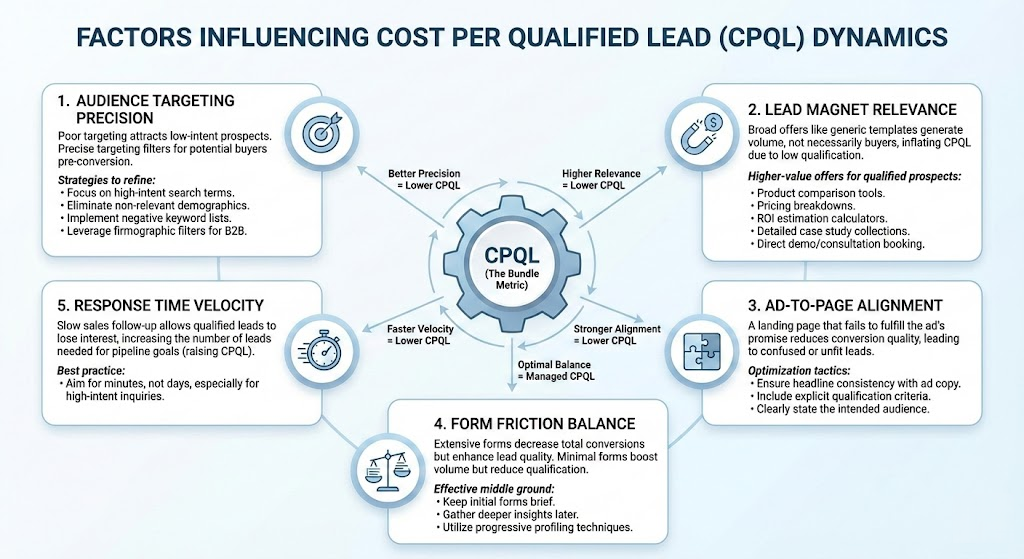
It all boils down to a delicate ecosystem of five specific core factors that dictate whether your acquisition costs skyrocket or smoothly settle into a manageable, highly profitable baseline. Let’s strip away the fluff and look at how these dynamics actually play out in the trenches.
1. Audience Targeting Precision
Poor targeting acts like a massive magnet for low-intent prospects. When you cast a net that is far too wide because you’re trying to hunt down massive volume, you inevitably pull in people who like your imagery but will never buy. Precise targeting filters out the noise before the conversion even happens. Better precision always equals a lower CPQL.
If you want to pull your acquisition costs down, your targeting framework needs aggressive refinement. Stop bidding on loose informational phrases and start targeting the exact transactional keywords your buyers use when they have an active problem to solve.
At the exact same time, implement strict negative keyword lists to prevent your ads from showing up on completely irrelevant searches. If you operate in the B2B landscape, you cannot rely on casual demographic filters. You need to stack firmographic filters—like precise company size, industry classification, and direct job titles—to ensure your ad budget is only spent on faces that fit your exact buyer persona.
2. Lead Magnet Relevance
We’ve all seen it. A brand offers a completely generic, surface-level PDF template, blows past their lead volume goals, and wonders why none of those leads ever close. Broad offers generate massive volume, but they do not generate buyers. They artificially inflate your CPQL down the road because you spend thousands of dollars filtering out people who just wanted a free download. Higher relevance equals lower CPQL.
To capture qualified prospects, your lead magnets need to be high-value and hyper-specific to the solution you provide. Swap out the generic ebooks for hyper-practical tools. We are talking about deep product comparison tools, clear pricing breakdowns, or transparent ROI estimation calculators that help a buyer build an internal business case.
Even presenting detailed, industry-specific case study collections can filter for high intent. When a prospect signs up for a direct live demo or a consultation booking, they aren’t just browsing; they are signaling that they are actively looking to make a move.
3. Ad-to-Page Alignment
Imagine clicking an ad that promises a custom automated workflow strategy, only to land on a generic homepage that talks about broad business consulting. It’s jarring. When a landing page fails to fulfill the exact promise made in your ad copy, conversion quality plummets immediately. You end up with a high bounce rate, or worse, confused leads who fill out the form without understanding what you actually do. Stronger alignment directly creates a lower CPQL.
Fixing this comes down to pure alignment tactics. Ensure absolute headline consistency between your ad copy and the landing page hero text. If the ad uses a specific phrase, that exact phrase should be the first thing the reader sees when the screen loads.
Furthermore, display your explicit qualification criteria right there on the page. Do not hide who this is for. Clearly state the intended audience, the budget requirements, or the technical setup needed to use your product. It might decrease your raw submission numbers, but it keeps your CPQL highly optimized because unfit leads will naturally drop off before wasting your team’s time.
4. Form Friction Balance
This is a continuous tug-of-war for every growth marketer. Extensive, multi-step forms will decrease your total conversions, but they dramatically enhance your overall lead quality. On the flip side, minimal one-click forms give you a massive boost in lead volume but completely reduce your qualification rate.
Your goal isn’t to make the form as short as possible; it’s to find the optimal balance where the friction serves as a helpful gatekeeper. Keep your initial forms relatively brief but incredibly strategic. Capture the baseline contact information first, and then gather deeper insights later in the journey. This is where you can use progressive profiling techniques. If a lead returns to your site, your system shouldn’t ask for their name again; it should ask for their current department size or their primary technical roadblock.
To orchestrate this level of complex data movement and keep your sales team aligned, you need a robust underlying infrastructure. This isn’t something you handle with manual copy-pasting. Sophisticated teams manage these flows by setting up automated tracking systems inside platforms like Hubspot to map every form touchpoint, or they orchestrate custom data pipelines via Zapier to route qualified data straight to their tools instantly.
5. Response Time Velocity
You can have the most precise targeting, the perfect lead magnet, and a pristine landing page, but if your sales follow-up is slow, none of it matters. When a qualified lead submits an inquiry, they are at the absolute peak of their interest. If you allow that lead to sit around for days, they lose interest, forget who you are, or simply move on to a competitor who answered them first. Slow execution raises the total number of leads you need to hit your pipeline goals, which dramatically raises your actual CPQL. Faster velocity equals lower CPQL.
The best practice here is brutal but simple: aim for minutes, not days. This is especially vital for high-intent inquiries like direct quote requests or pricing pages.
If your human team can’t leap onto a phone call within five minutes, you must put automated safety nets in place. Use instant, highly personalized transactional messages to book them into a calendar immediately. To keep this engine running smoothly, top-performing sales organizations manage their internal tasks and lead assignments inside specialized management environments. Teams will map out their follow-up processes using Monday to visually track lead statuses, or rely on platforms like Asana to assign immediate ownership to account executives the second a high-value form is cleared.
Balancing the Bundle Metric
At the end of the day, CPQL isn’t an isolated metric that you can tune with a single dial. It is a bundle metric—a direct reflection of how well your targeting, messaging, friction, and internal sales velocity work together in harmony.
Stop chasing cheap clicks that fill your database with ghosts. Refine your audience targeting, align your landing pages flawlessly, find the right amount of form friction, and treat every single minute of response time like a ticking clock. That is how you drive acquisition costs down, keep your sales team happy, and build a pipeline that actually impacts the bottom line.


Leave a Comment