
A legal operations manager I know once discovered that their sales team was saving finalized corporate NDAs and customer contracts in a shared Google Drive folder that was open to the entire company.
Anyone—from the freelance copywriter to the summer intern—could browse through their largest customer agreements, executive compensation plans, and proprietary vendor terms.
When she pointed out the security risk, the sales rep replied, “But it is in the cloud, so it is secure, right?” It was a classic case of assuming that hosting data online is the same as protecting it from unauthorized access.
Many business owners confuse cloud access with cloud security. Once a contract, employee agreement, or financial document is signed, it represents a goldmine for identity thieves and corporate competitors.
Storing sensitive files in general-access folders or leaving them in your email inbox is a major liability. Security is not just about keeping files online; it is about controlling exactly who can view them, ensuring they are encrypted at rest, and maintaining a clean audit trail.
Here is how to set up your contract storage system using tools like DocuSign, Box, Dropbox, and IDrive.
Role-Based Access (Who Actually Needs to See This?)
The first step in locking down signed contracts is keeping them out of broad shared folders. If anyone in your company can browse your NDAs or vendor rates, you are asking for trouble.
Instead of using a standard folder for everything, use a platform like Box to set up strict permission levels. It gives you enterprise-grade sharing controls, letting you set up read-only access for sales reps, edit rights for legal, and temporary view links for external partners.
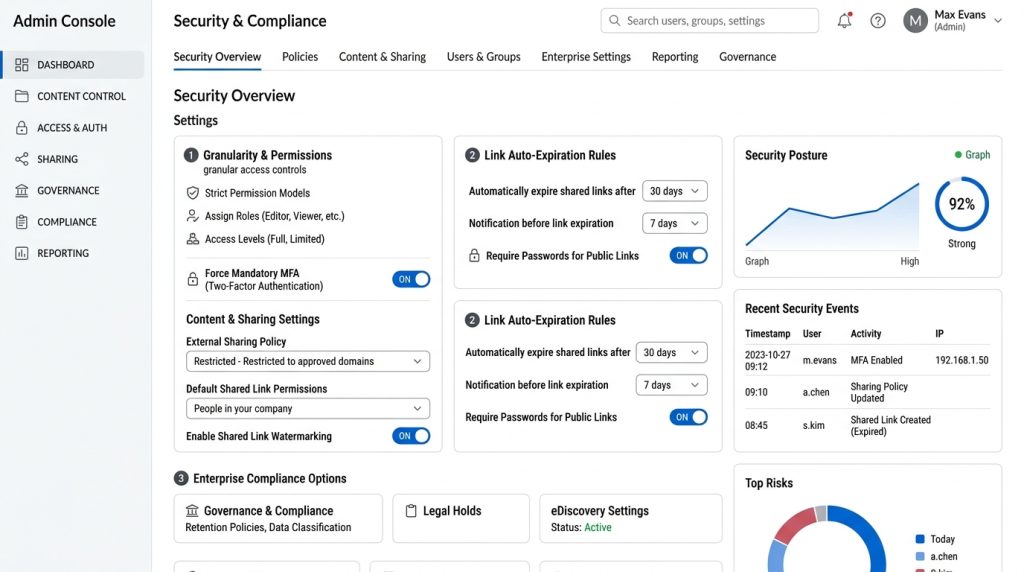
Box also includes detailed admin controls that let you monitor who has downloaded, viewed, or shared a file. This ensures you always know who has handled sensitive data and gives your security team complete visibility.
Protecting Data with Encryption and Syncing
If your document storage provider does not encrypt your files both in transit and at rest, your business data is vulnerable to interception.
When you upload a signed PDF contract, the system must encrypt the file before it is written to the physical storage server. With Dropbox, your files are encrypted the moment you send them up and stay that way on their servers.

They also save your edit history in real time. If a client edits a clause or deletes a page by accident, you can roll the document back to the exact file that was signed.
This protects your legal records from accidental overwrite or ransomware attacks that attempt to lock your local server files.
Automatic Archiving and E-Sign Integration
The most secure document storage systems are automated. If you rely on sales reps to manually download signed PDFs from their signing app and upload them to your company storage, files will get lost.
Some agreements will sit in email threads, while others will remain inside individual user accounts. To close this gap, you should integrate your electronic signature tool directly with your cloud storage platform. For electronic signatures, DocuSign provides a streamlined platform to sign and send documents from virtually anywhere.
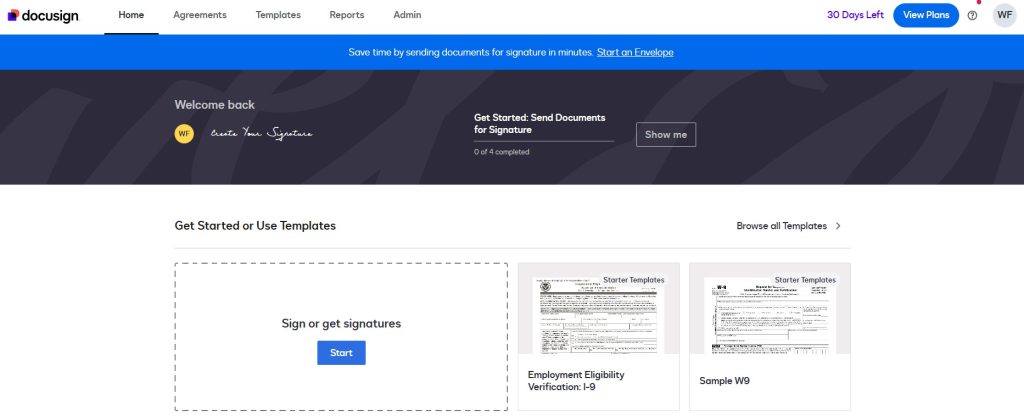
You can build automation links so that as soon as everyone signs an agreement, the system automatically renames the PDF, sorts it by client, and moves it to your secure repository. This simple connection saves your sales team from having to download and sort files manually after every close.
Why You Shouldn’t Rely on E-Sign Inboxes for Storage
Many managers assume that keeping signed files inside their e-signature vendor dashboard (like DocuSign) is a complete document storage plan. While these portals are highly secure, they are designed for transaction routing, not long-term file organization.
Over time, individual user logins get deactivated, plan tiers change, and employees leave the organization with sensitive signed documents locked inside their old private profiles.
If a client disputes a contract clause three years down the line, digging through transaction histories inside an active signing portal is slow and frustrating. Moving completed deals to a single, searchable business drive gives your legal department a clean, independent record of all signed deals.
The Backup Trap (Why One Cloud Account is a Gamble)
Keeping all your files in one cloud bucket is a major risk. If your primary cloud storage goes offline or a user account gets hacked, your business could lose access to key vendor contracts. Having an independent backup setup keeps things running. A backup platform like IDrive lets you run secure, real-time syncing across all your local machines and servers under a single login.

If you have massive archives of legacy files to migrate, their physical shipping service lets you send data drives directly to their facility to save your local bandwidth. Keeping a secondary, encrypted copy of your signed folders ensures your business records stay safe in an emergency.
The Signature Certificate: Don’t Lose the Audit Trail
Every time someone signs a document online, the platform creates a signature log. This certificate contains the actual proof of who signed: IP addresses, verification links, and exact timestamps. If you download only the contract pages, you lose this data.
If a customer later disputes a clause or claims they didn’t sign, without that audit log, your case is hard to prove in court. Make sure to pull down the entire document package, signature certificate and all. Having that complete record is what makes the agreement hold up if you ever have to defend it in court.
Searching Without Exposing Data
Hunting through fifty random PDFs just to check a single renewal date is not just a massive waste of time—it is a serious security headache. Every time someone on your team opens a contract they do not strictly need to see, you risk exposing confidential pricing terms, vendor discounts, and personal contact info.
Metadata tags solve this cleanly. In platforms like Box or Dropbox, you can slap custom tags directly onto your files—things like client names, contract tiers, expiration quarters, or lead signatories. When your finance lead needs to audit all vendor deals up for renewal in Q3, they search that specific tag and get the exact list instantly without peeking inside a single document.
Dropbox also has deep content search that indexes the text inside your PDFs without opening them. You can search for a unique clause or purchase order number, get a quick preview showing the exact line, and confirm what you need in seconds without circulating the full file.
Locking Down Your Document Workflows
Great software will not save you if your team’s daily habits are sloppy. Most document leaks do not come from elite hackers cracking encryption algorithms; they happen because someone forwarded a PDF to the wrong recipient or left a shared link wide open.
Here are a few ground rules worth enforcing across your team:
- Kill email attachments for good: Sending signed PDFs as raw email attachments is like mailing cash in a clear envelope. Once that email leaves your outbox, you lose all control over where it gets forwarded or stored. Always send a restricted, password-protected link to the file in your cloud vault instead.
- Slap expiration timers on external links: Whenever you share a contract with an outside accountant, legal counsel, or client, set the link to self-destruct after forty-eight hours or after a single download. Do not leave live download links floating in people’s inboxes indefinitely.
- Run a monthly permission purge: Contractors wrap up their gigs, employees swap teams, and people leave the company. Put a recurring 15-minute slot on your calendar at the end of each month to audit folder access and kick out anyone who should not have their eyes on your contracts anymore.
Security mistakes that expose your contracts
Even teams with good intentions trip over these routine traps:
- Dumping contracts on local desktops: A sales rep closes a deal, downloads the signed PDF to their laptop desktop, and leaves it there. If that laptop gets left in a rideshare or hit with local malware, that contract is gone. Enforce a strict policy: nothing sensitive lives on local drives.
- Shadow IT and personal cloud drives: When someone is rushing to meet a deadline and permissions get tricky, they might throw a contract into their personal Google Drive or cloud transfer service just to get it out the door. That breaks your compliance chain instantly. Lock down tool usage to your approved corporate stack.
- Forgetting about vendor-side turnover: You might keep your own house clean, but what about the client side? When a point of contact at a partner company leaves, make sure their access to shared contract folders is cut immediately so the replacement contact takes over cleanly.
Connecting your e-signature tool directly to your cloud storage, enforcing tight folder permissions, and maintaining an off-site backup takes minimal effort to set up. Once those rails are in place, your legal assets stay locked down while your team keeps moving fast.
Conclusion
Securing your signed documents is not about locking down every folder so tightly that nobody on your team can get work done. It is about setting up a clean, automated system where contracts flow straight from your signature tool into a protected, encrypted vault—without depending on anyone to manually drag and drop files.
When you pair strict role-based access in Box or Dropbox with an off-site disaster backup in IDrive, you protect your business from both insider leaks and external outages. Always preserve the full audit log, keep sharing links on short timers, and review your user permissions once a month.
Getting these basic habits in place takes an afternoon, but it prevents the kind of contract leaks and compliance nightmares that can cost a business thousands of dollars down the line. Treat your signed agreements with the same security you give your financial accounts, and your company records will stay protected.


Leave a Comment