
Finishing a huge project feels amazing. You ship the final files, shut your laptop, and wait for the cash to hit your bank account.
But then… nothing. Days roll by, and before you know it, you’re drafting those painfully polite follow-up emails. Anyone running a freelance business or a small agency knows this exact frustration. Chasing down the money you already worked hard for is exhausting, awkward, and a complete waste of your energy.
Here is the thing: most clients who pay late aren’t actually trying to rip you off. More often than not, payments get delayed because the invoicing process is clunky, confusing, or just plain slow. If you make it hard for a client to pay you, they will put it off. Fortunately, making a few simple tweaks to how you write and send invoices can dramatically speed up your cash flow. Let’s break down exactly how to do it.
Why Getting Your Invoices Right is a Huge Deal
Many business owners treat invoicing as a boring administrative chore—something they throw together at the very end of the month. But your invoice is actually one of the most important touchpoints in your client relationship.
When you send a clean, detailed, and professional invoice:
- Your client immediately understands what they are paying for, which cuts out confusing back-and-forth emails.
- Whoever handles the client’s books can pay you without running into confusing roadblocks.
- You establish yourself as a professional who runs a real business, not just someone doing side projects.
- You keep your cash flow predictable, which keeps your business healthy and growing.
A messy, vague invoice is a recipe for delays. A clear one gets paid.
The Non-Negotiables: What Must Go on Your Invoice
If you want to get paid on time, you cannot leave room for questions. If a client has to email you to ask for your bank details or clarify a charge, your invoice goes to the bottom of the pile.
First, make sure you address the document to the correct contact. If you send it to a general inbox at a large company, it might get lost for weeks. Find out who handles accounts payable and address it to them directly.
Next, give the invoice a unique number. Running a sequence like 1001, 1002, and so on keeps things organized. You also need clear dates—specifically, the day you sent it and the deadline for payment. When you list your services, describe them clearly instead of writing “work done”. If you redesign a homepage, write that down. Finally, include your bank transfer information or payment link so the client knows exactly where the money needs to go.
How the Payment Flow Should Actually Look
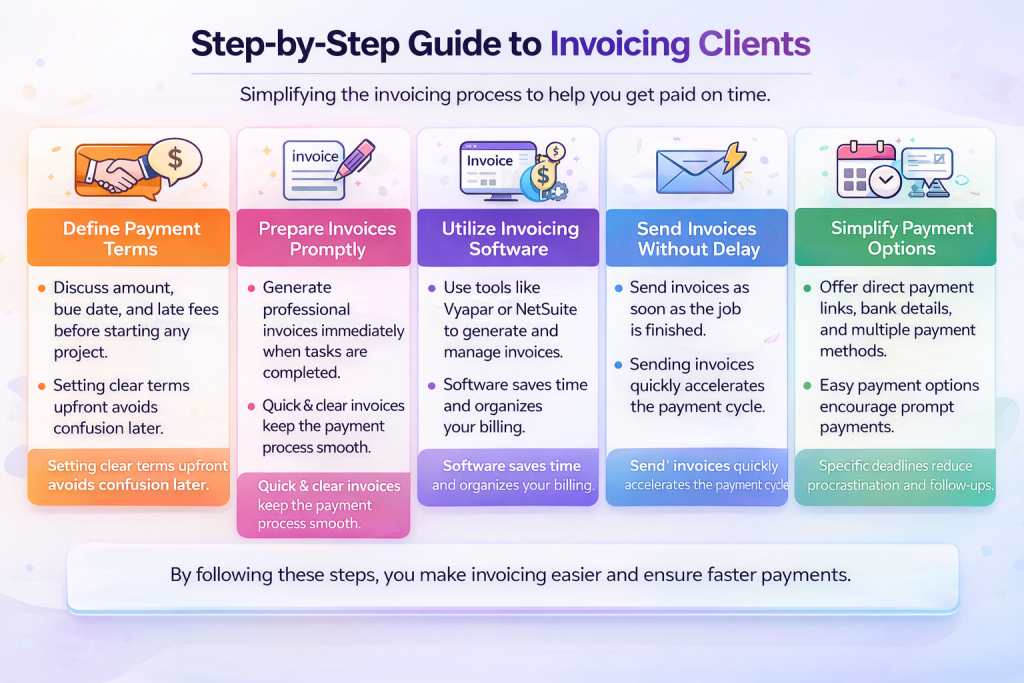
Getting paid on time isn’t something you worry about only after the project wraps up. It starts before you even write a line of code or sketch a design. First, align on the project fees, the invoicing timeline, and deposit requirements. For big projects, asking for a deposit (like 30% or 50% upfront) is standard practice and makes sure the client is fully invested.
When the work is done, you want to build the invoice quickly. Instead of wasting time formatting documents from scratch in Word or Excel, check out this guide on how to create an invoice in minutes. A consistent template saves you a ton of time and keeps your brand looking cohesive.
Once you have a layout you like, let software handle the daily tracking. Typing invoices by hand and checking your bank account every morning is a waste of your energy. Modern billing apps can send invoices, track due dates, and even email clients when they forget to pay.
For example, Vyapar is fantastic for small businesses that need to track inventory, billing, and basic accounting in one app.
If you are managing a larger team or handling massive projects, NetSuite integrates your invoicing directly with your company’s broader financial planning tools.
For freelancers and agencies working with international clients, Payoneer makes it incredibly simple to request and receive payments in different currencies without getting eaten alive by bank transfer fees.


Finding the Right Way to Bill
Different approaches work depending on how many clients you have:

- Drafting bills manually in Word or Excel: This is slow, and it’s easy to make copy-paste mistakes. It works fine if you only have one client, but it quickly becomes a mess when you take on more work.
- Using invoice templates: While you get a head start by not designing the page yourself, you still have to keep tabs on who paid and send follow-ups manually.
- Going with dedicated billing software: This option is lightning fast. You get invoices out the door in seconds, set up reminders to send on autopilot, and give clients a button to pay you right then and there.
Small Shifts that Speed Up Payments
If you want to speed up the process, you need to make it as simple as possible for the client to pay you:
- Invoice immediately. Don’t wait until the end of the month to bill for work completed on the fifth. Send the invoice as soon as you deliver the project while your value is still fresh in the client’s mind.
- Make paying you incredibly easy. If your client has to log into their bank portal, set up a new contact, and manually enter routing numbers, they will wait until the weekend to do it. If you give them a direct payment button where they can use a credit card, they will pay right away.
- Set firm deadlines. Never use vague terms like “due upon receipt.” Give them a calendar date instead, like saying the payment needs to land by October 15, 2026. This gives them a clear date to put into their system.
Dealing with Late Payers (Without Burning Bridges)
Even if you do everything right, you will eventually run into a client who drags their feet. When that happens, you need to handle it professionally.
Here is how to handle unpaid invoices:
- Set up polite, automated reminders. Let your software do the dirty work. A gentle email sent three days before the deadline, on the due date, and three days after is usually enough to jog their memory.
- Hit the pause button on the project. If a client is late paying, don’t keep working for free. Drop them a quick line saying you have to hold off on any new work until the current bill is taken care of. Keep the tone friendly but firm—there’s no need to make it personal.
- Stay professional and calm. Keep your messages professional, objective, and short. Most of the time, the client just forgot, and a gentle reminder is all it takes to get paid.
The Takeaway
When you get down to it, getting paid on time isn’t about using aggressive collections. It’s about setting up a clear, simple system that makes paying you incredibly easy.
When you align on terms early, send out clear bills immediately, and use the right tools, you remove the friction. You get to spend your weekends relaxing instead of chasing down unpaid invoices, so you can focus on the work you actually love.


Leave a Comment