Data breaches are not just “big company” problems anymore. If you store customer details, employee records, payment info, or even basic login data, you are a target. The good news is you can prevent most breaches with strong basics, consistent habits, and a plan your team can actually follow.
This post covers practical, real-world data breach prevention best practices you can use in any business. No complicated jargon. Just clear steps that reduce risk and help you respond fast if something goes wrong.
What Causes Most Data Breaches?
A data breach usually happens when someone gets access to information they should not have. That can be a hacker, a scammer, or sometimes even an employee mistake.
Common causes include:
- Weak or reused passwords (Always use password manager or password apps like Lastpass)
- Missing multi-factor authentication
- Unpatched software
- Phishing emails that trick employees
- Too much access given to too many people
- Sensitive data stored without encryption
- Poor vendor security
- No monitoring, so attacks go unnoticed

You do not need to fix everything overnight, but you do need a system. That is where best practices come in.
Start With a Simple Security Framework
One of the easiest ways to stay organized is to follow a framework. Frameworks are not just for large enterprises. They help smaller teams too because they stop you from guessing.
A popular one is the NIST Cybersecurity Framework, which is built around clear functions like Identify, Protect, Detect, Respond, Recover, and Govern. This gives you a practical structure: know what you have, protect it, watch for threats, respond fast, and recover with minimal damage.
You can also use the CIS Controls as a checklist-style approach for “essential cyber hygiene”. Frameworks are helpful because they keep your efforts focused and measurable.
Best Practices to Prevent Data Breaches
Below are the strongest prevention steps most organizations can apply immediately.
1. Know What Data You Have and Where It Lives
You cannot protect what you cannot find. Start with a basic inventory:
- Where is customer data stored?
- Where are employee files stored?
- What systems store payment details?
- What data sits in email inboxes?
- What data is stored in cloud tools and shared drives?
Then classify it:
- Public (safe to share)
- Internal (not public, but not sensitive)
- Sensitive (personal data, financial info, healthcare info)
- Critical (high-risk data that would cause major harm if leaked)
Data classification is a core part of many security control approaches and helps you decide what deserves the strictest protection.
2. Enforce Strong Authentication Everywhere
This is one of the highest impact steps.
Do these three things:
- Require multi-factor authentication (MFA) for email, VPN, payroll tools, admin dashboards, and cloud services.
- Use password managers so people do not reuse passwords.
- Set policies for long, unique passwords.
If remote access is used, MFA is a must. Guidance tied to ransomware defense often highlights MFA and strong password policies as key protective actions.
3. Use Role-Based Access and Least Privilege
A lot of breaches get worse because one compromised account can access everything.
Fix this by using least privilege:
- Give people access only to what they need.
- Remove access when roles change.
- Disable accounts immediately when someone leaves.
- Separate admin accounts from normal accounts.
Role-based access control is also commonly highlighted in access control best practices.
4. Patch Fast and Patch Smart
Unpatched software is one of the most common ways attackers get in. Updates are annoying, but breaches are worse.
Build a patch routine:
- List your key systems: laptops, servers, cloud apps, routers, VPNs.
- Prioritize critical security patches.
- Patch on a schedule, and patch emergencies immediately.
- Track what was patched and when.
A good patch program reduces your exposure to known vulnerabilities, which attackers love to exploit.
5. Train People to Spot Phishing and Social Engineering
Phishing still works because it targets humans, not systems.
Teach employees to:
- Check sender names carefully
- Avoid clicking unknown links
- Never share MFA codes
- Verify payment requests by phone or internal process
- Report suspicious emails fast
Security awareness training is specifically called out as a key part of “Protect” practices in frameworks like the NIST CSF.
6. Secure Remote Access and Block Easy Entry Points
Remote access is convenient, but it also creates extra attack surfaces.
To secure it:
- Lock down remote desktop access and close unused ports
- Require MFA for VPN and remote tools
- Log access attempts and flag suspicious logins
- Use account lockouts after repeated failed login attempts
Ransomware defense guidance often recommends auditing and restricting RDP, patching remote access tools, and enforcing MFA for VPN connections.
7. Encrypt Data at Rest and in Transit
Encryption protects your data even if someone steals it.
Basic rules:
- Use HTTPS for websites and apps.
- Encrypt sensitive databases and backups.
- Encrypt laptops and mobile devices.
- Encrypt cloud storage when possible.
Encryption is a common recommendation inside system and communications protection controls.
8. Backups That Actually Work
Backups are not just about accidents. They are also your lifeline in ransomware and data extortion incidents.
Backup best practices:
- Follow the 3-2-1 rule: 3 copies, 2 different formats, 1 offsite. (Use trusted tool like Commvault.)
- Use immutable or write-protected backups if possible.
- Test restores regularly.
- Limit who can access backup systems.
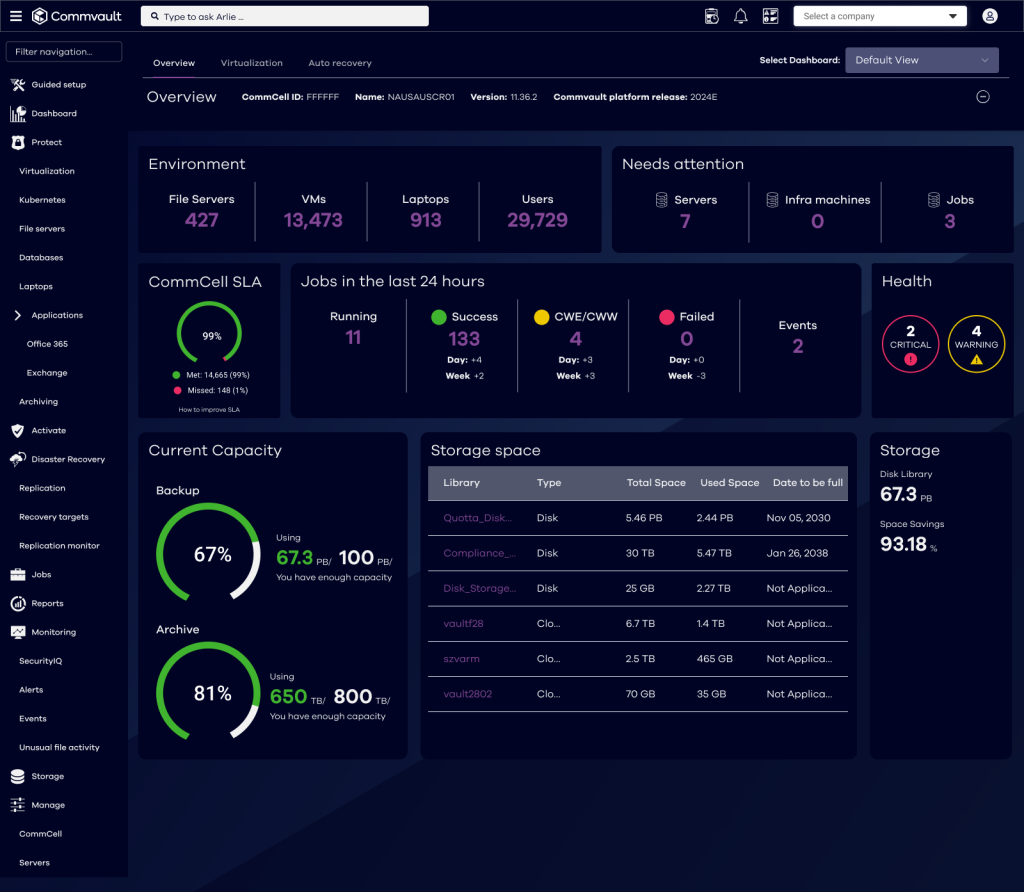
Ransomware guidance often stresses defense-in-depth and recovery planning, and backups are a major part of recovery readiness.
9. Add Monitoring and Log Alerts
If you do not detect an attack, you cannot stop it.
Start with:
- Login alerts for new devices and locations
- Alerts for mass downloads or exports
- Endpoint monitoring on laptops
- Central logging for key systems
Even basic monitoring helps you catch abnormal behavior early, before a breach becomes a disaster.
10. Segment Your Network and Protect Critical Systems
Segmentation means not everything lives on one flat network. If an attacker breaks into one system, they should not be able to move everywhere.
Good segmentation looks like:
- Separating finance systems from general office tools
- Separating IT systems from operational systems
- Restricting access between departments
CISA-related ransomware defense guidance often mentions segmentation as part of defense-in-depth to reduce lateral movement.
11. Control Third-Party and Vendor Risk
Vendors can become your weak link. This is common with cloud tools, outsourced IT, payment processors, and marketing platforms.
Vendor best practices:
- Require MFA and encryption on vendor platforms
- Ask for security documentation
- Review contracts for breach reporting timelines
- Limit the data you share with vendors
- Remove vendors you no longer use
Framework-based security approaches often emphasize supply chain awareness because third-party access can introduce major risk.
12. Create a Simple Incident Response Plan
Even with strong prevention, you still need to plan for the day something goes wrong. A basic plan helps you respond quickly and reduce damage.
Your incident response plan should include:
- Who owns decisions during an incident
- How to isolate affected systems
- How to preserve logs and evidence
- Who contacts customers, legal counsel, and regulators
- Steps to restore systems safely
- A checklist for ransomware or data theft scenarios
CISA-style guidance includes step-by-step response checklists that help teams move fast during ransomware and extortion incidents.
A Simple Data Breach Prevention Checklist
If you want a fast starting point, use this.
- Turn on MFA everywhere.
- Patch critical systems and VPN tools.
- Restrict access using least privilege.
- Encrypt laptops, backups, and sensitive databases.
- Train staff on phishing quarterly.
- Enable security logging and alerts.
- Set up tested backups with limited access.
- Create an incident response plan and run one tabletop test.
This list is not fancy, but it works.
Common Mistakes That Increase Breach Risk
Even strong teams make these mistakes:
- Relying on passwords only, no MFA
- Leaving old accounts active
- Letting everyone access shared drives
- Ignoring updates for “stable” systems
- Thinking “we are too small to be targeted”
- Never testing backups
- No clear incident response owner
Most breaches are not caused by one huge failure. They happen because several small gaps line up at the same time.
Wrap Up
Data breach prevention is not about being perfect. It is about building strong daily habits, tightening access, and making it harder for attackers to win. If you focus on MFA, patching, least privilege, encryption, backups, monitoring, and training, you will block most common attack paths.
Start with the basics this week. Pick three improvements you can implement quickly and do them. Then build the next layer month by month. Security becomes manageable when you treat it like a system, not a one-time project.


Leave a Comment