
If your business uses live chat, WhatsApp, in‑app messaging, or social DMs to talk with customers, then real‑time chat monitoring is not just “nice to have” anymore. It is how you protect your brand, coach your agents, and keep customers from quietly slipping away to a competitor.
The challenge is doing it well. You want visibility into conversations without creeping out your team or overwhelming managers with endless transcripts. In this guide, we will walk through how to monitor chat conversations in real time in a way that is efficient, ethical, and actually useful for your business.
We will cover what real‑time monitoring really means, what tools you need, how to set things up step by step, and practical tactics you can use today.
What Real‑Time Chat Monitoring Actually Means?
Real‑time chat monitoring is the practice of observing live conversations as they happen. That can include:
- Watching active customer chats in a dashboard
- Getting alerts when certain keywords, SLAs, or sentiment thresholds are hit
- Jumping into an ongoing chat to help an agent (with or without the customer seeing it)
- Reviewing performance metrics as they update second by second
The goal is not to spy. Done properly, real‑time monitoring helps you:
- Catch problems before they turn into churn
- Support new or struggling agents live
- Protect against abuse or compliance issues
- Maintain a consistent quality of service across shifts and channels
Think of it as air traffic control for your customer conversations.
Why Real‑Time Monitoring Matters?
If you are still relying only on weekly QA reviews or monthly reports, you are reacting late. Real‑time monitoring gives you:
Faster recovery
You catch long wait times, angry customers, or stuck agents while the chat is still open, not hours later.
- Better coaching opportunities
Supervisors can shadow chats, send whisper messages to agents, or take over when needed. - Higher customer satisfaction
When response times are tight and answers feel consistent, CSAT and NPS scores improve. - Reduced risk
You can watch for language that may break compliance rules, reveal sensitive data, or escalate into abuse. - Stronger team performance
Live dashboards make work visible. Agents know when queues spike and can adjust their pace and focus.
Core Features You Need In A Monitoring Setup
No matter which platform or tech stack you use, an effective real‑time monitoring setup usually includes:
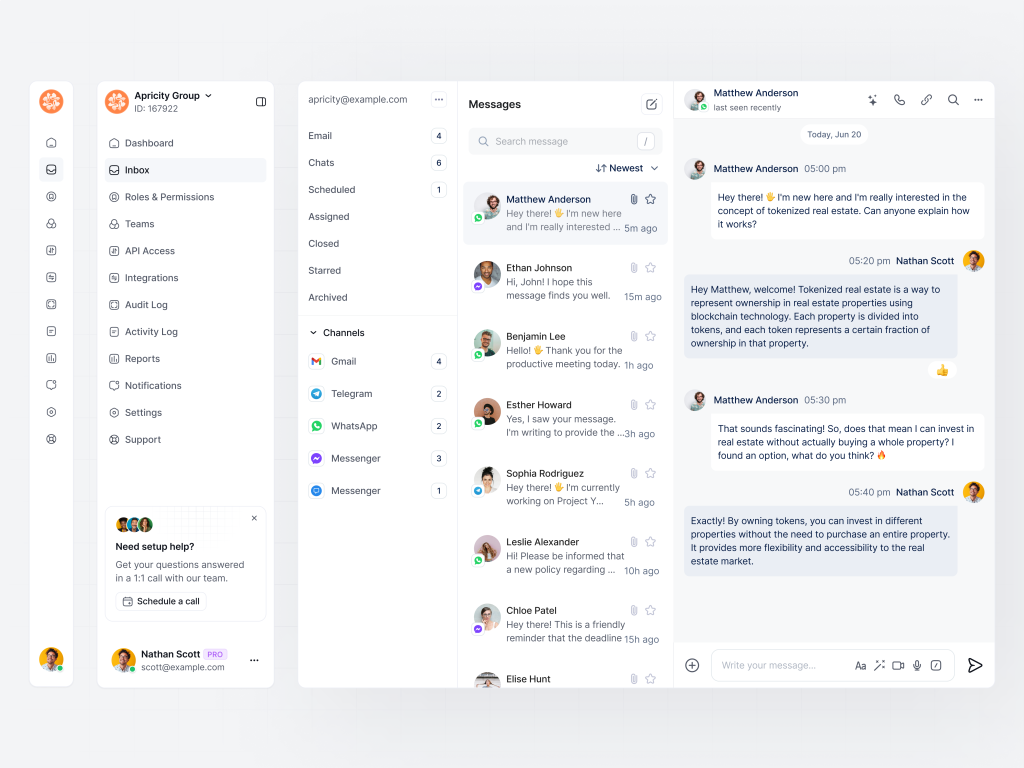
- Live chat list
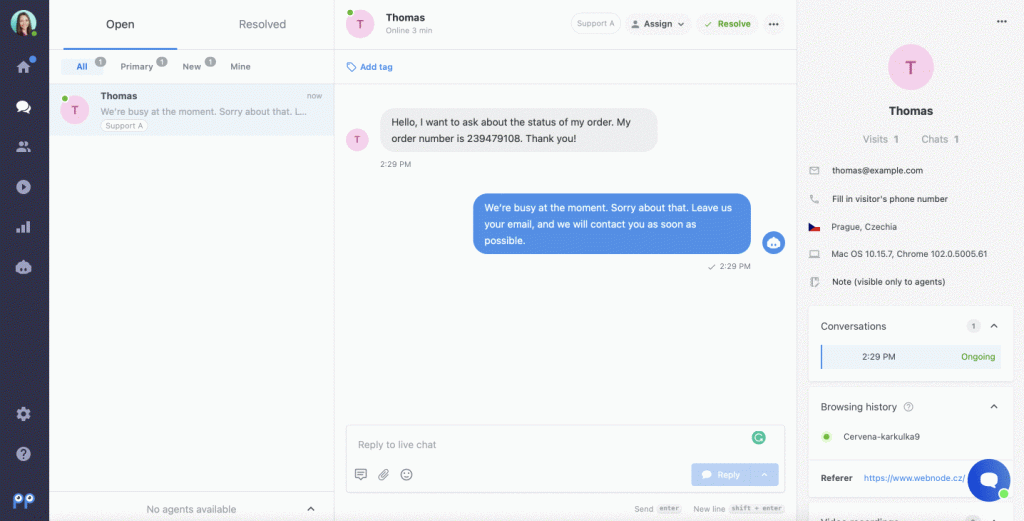
A panel showing all active conversations, who is handling them, and how long they have been open. - Conversation preview
The ability to click into a chat and see the full message history as it unfolds. - Supervisor actions
Options like “join chat,” “take over,” or “whisper to agent” without disturbing the customer experience. - Real‑time metrics
Live stats such as queue length, average handle time, first response time, and sentiment trends. - Alerts and triggers
Notifications for conditions like:
- Customer waiting more than X seconds
- Certain keywords (refund, cancel, lawsuit, etc.)
- Negative sentiment spikes
- VIP customers entering the chat
- Audit and logs
Full transcripts stored for QA, training, and compliance.
Step‑By‑Step: How To Set Up Real‑Time Monitoring
You can use an all‑in‑one customer service platform, a contact center suite, or your own custom stack. The steps below apply in most cases.
1. Map Your Chat Channels
Start by listing every place customers can chat with you:
- Website live chat
- Mobile app chat
- WhatsApp / SMS
- Facebook Messenger, Instagram DM, X (Twitter) messages
- In‑product support widgets
You want to monitor all of them in one place if possible. This means either:
- Using a platform that integrates those channels natively, or
- Connecting them through APIs and a central dashboard your team can use.
2. Choose Or Configure Your Chat Platform
If you already use a customer support tool with live chat, explore its monitoring features first. Typically you will be able to:
- See an “Active conversations” view
- Filter by agent, queue, or tag
- Open any existing chat in observer mode
If you are starting from scratch, choose a platform that offers:
- Multi‑channel chat
- Real‑time dashboards
- Supervisor / team lead roles
- Strong reporting and QA features
Make sure you can restrict who can view what, especially for sensitive industries like healthcare, finance, or education.
3. Set Up User Roles And Permissions
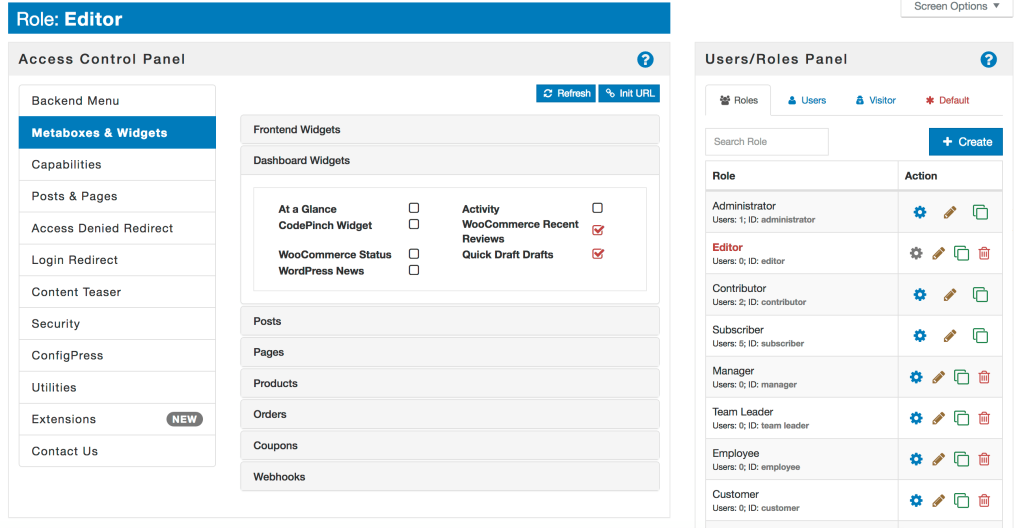
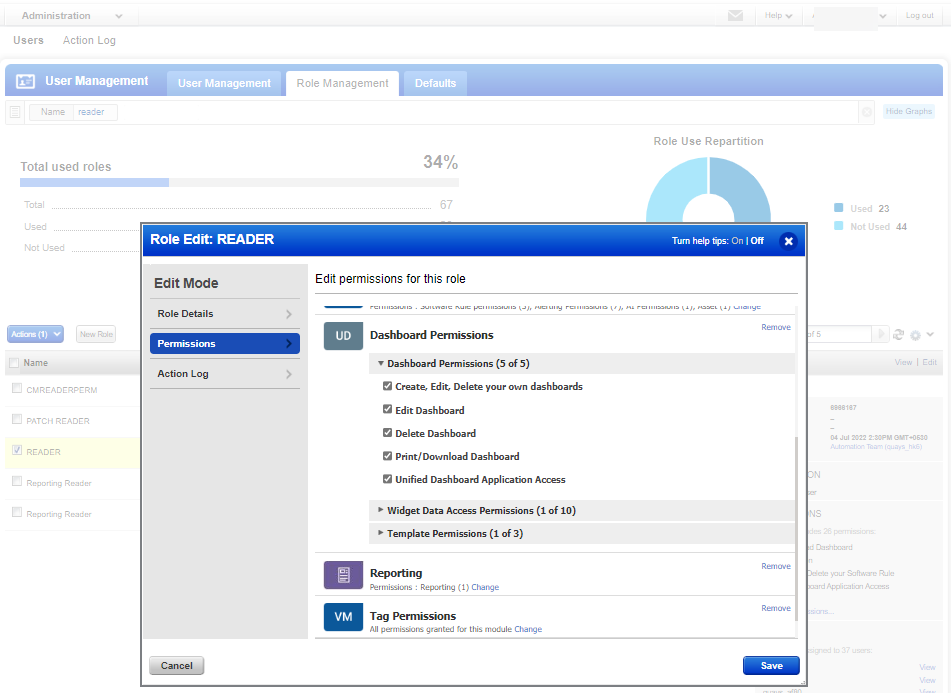
Monitoring is powerful, so you want the right guardrails.
Create at least these roles:
- Agent
Can only see their own chat sessions (or those assigned to their team). - Supervisor / Team Lead
Can view all live chats in their group, whisper, join, or take over. - Administrator
Can set account‑wide policies, alerts, and access rules.
Keep permissions tight. Do not give everyone admin rights “just in case.” It is better to start restrictive and open up as needed.
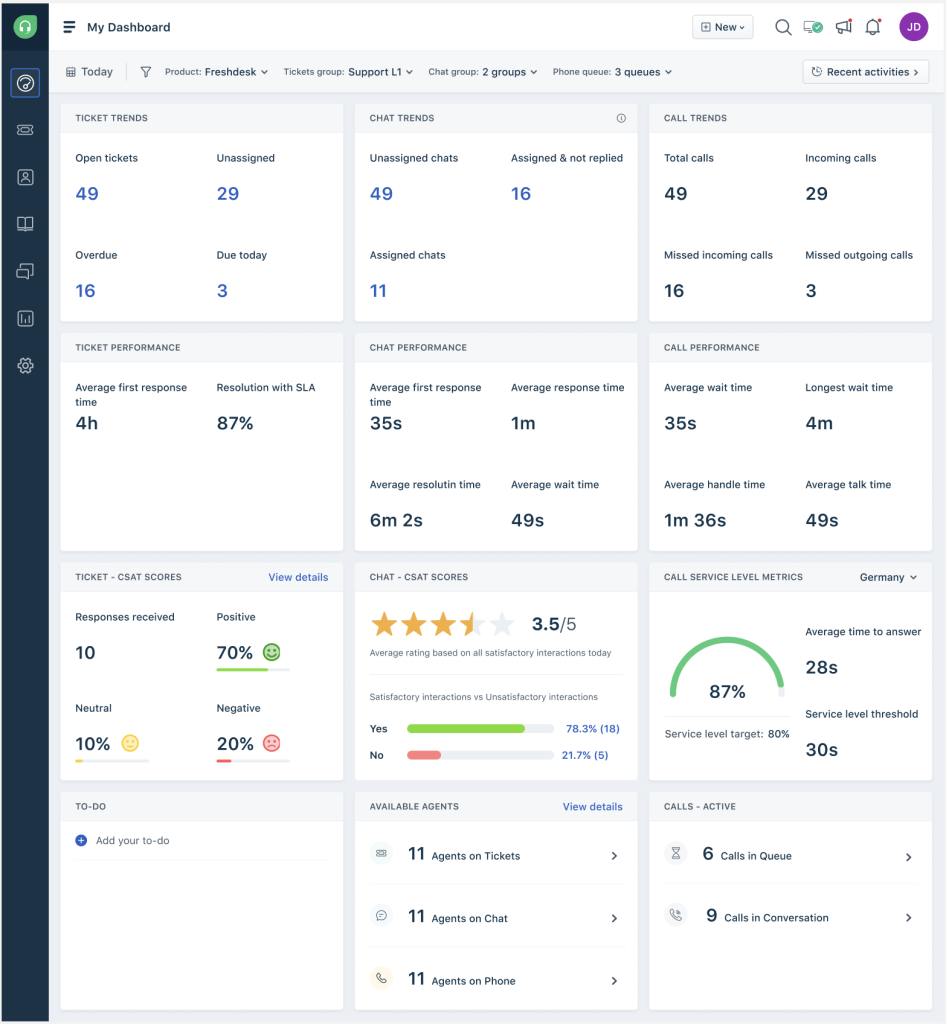
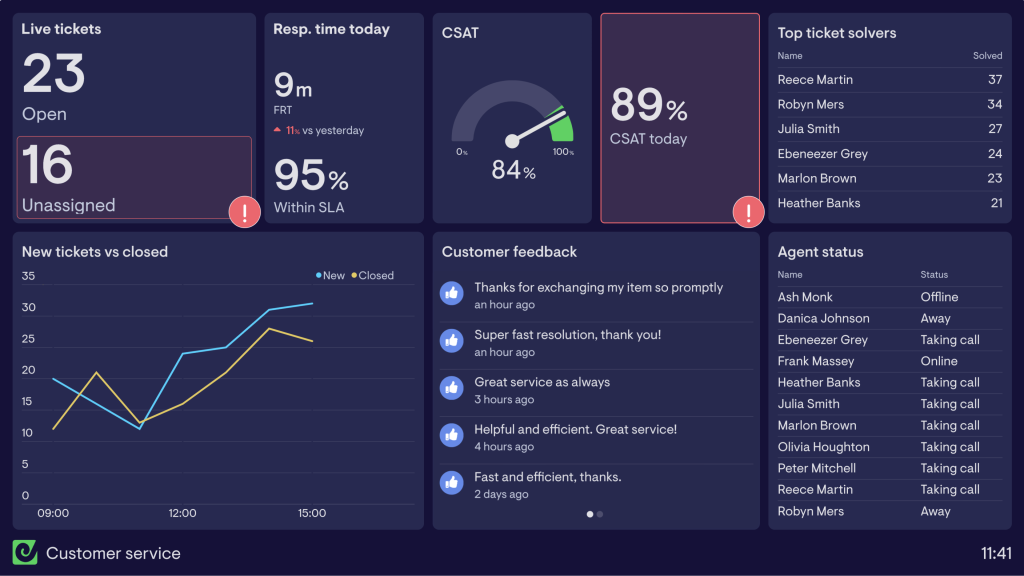
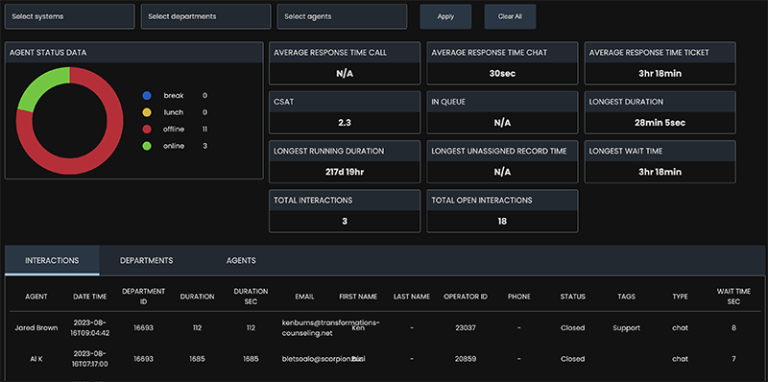
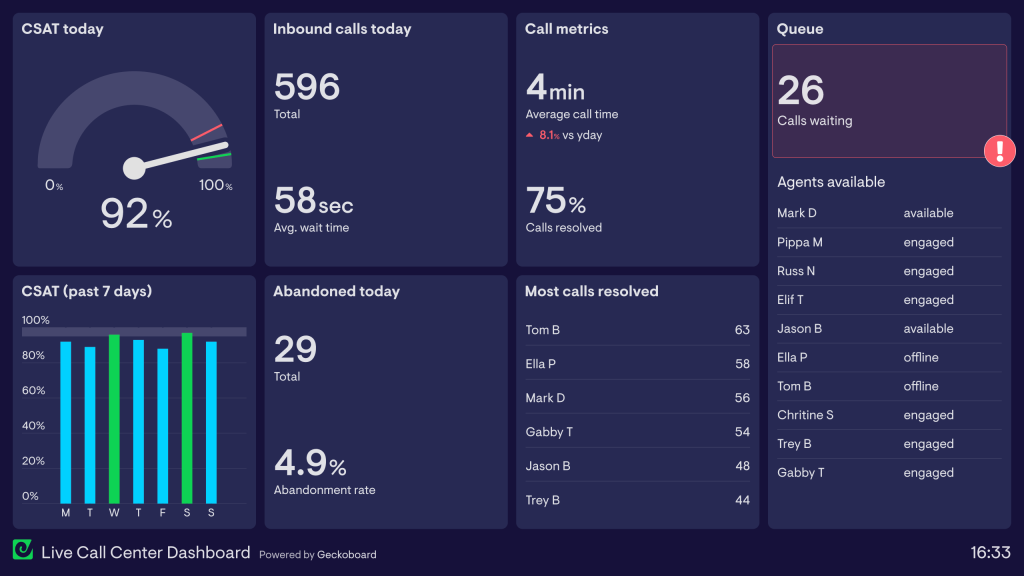
4. Build A Real‑Time Dashboard
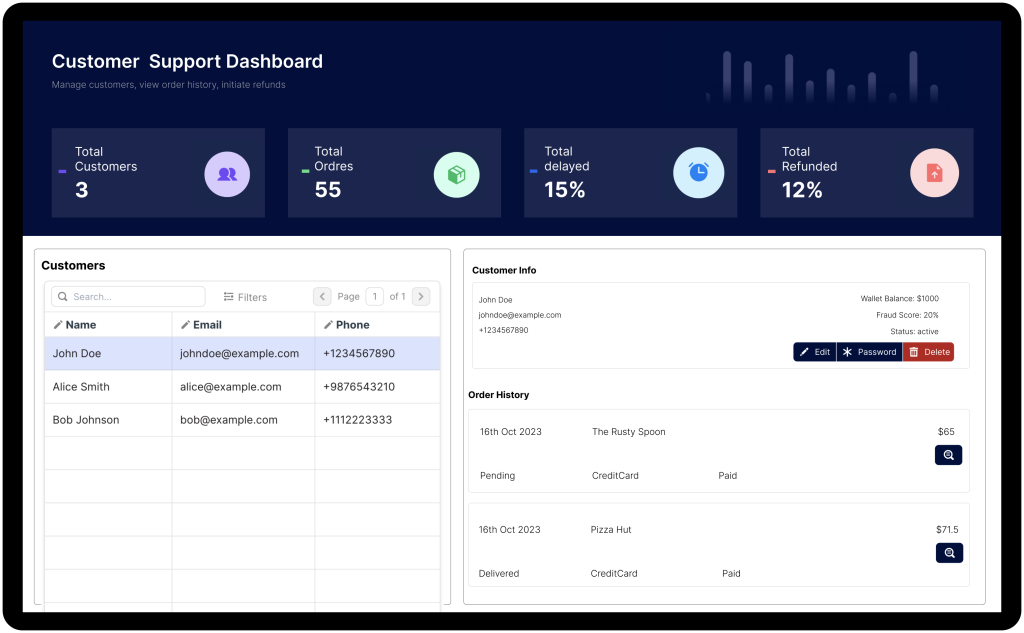
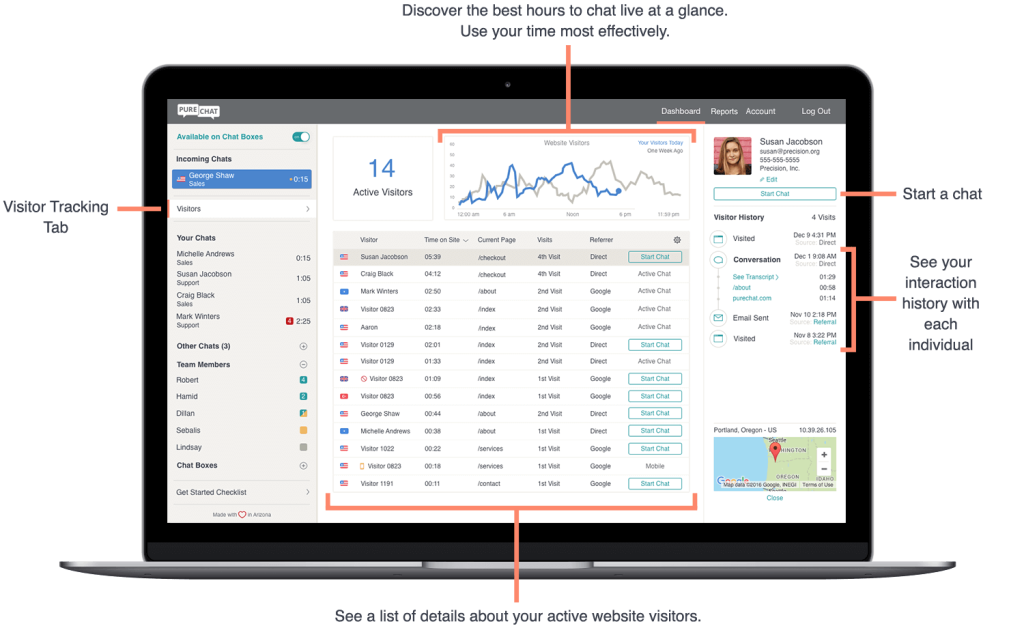
Next, configure dashboards and views your supervisors will actually use.
Useful widgets include:
- Number of visitors browsing the site right now
- Number of active chats
- Queue length and average wait time
- Chats per agent and their current status (available, busy, away)
- Live CSAT / sentiment (if available)
- SLA breaches or at‑risk conversations
Make it easy to click from a metric straight into the relevant conversation list. For example, clicking “At risk” should show all chats tagged with negative sentiment or long wait times.
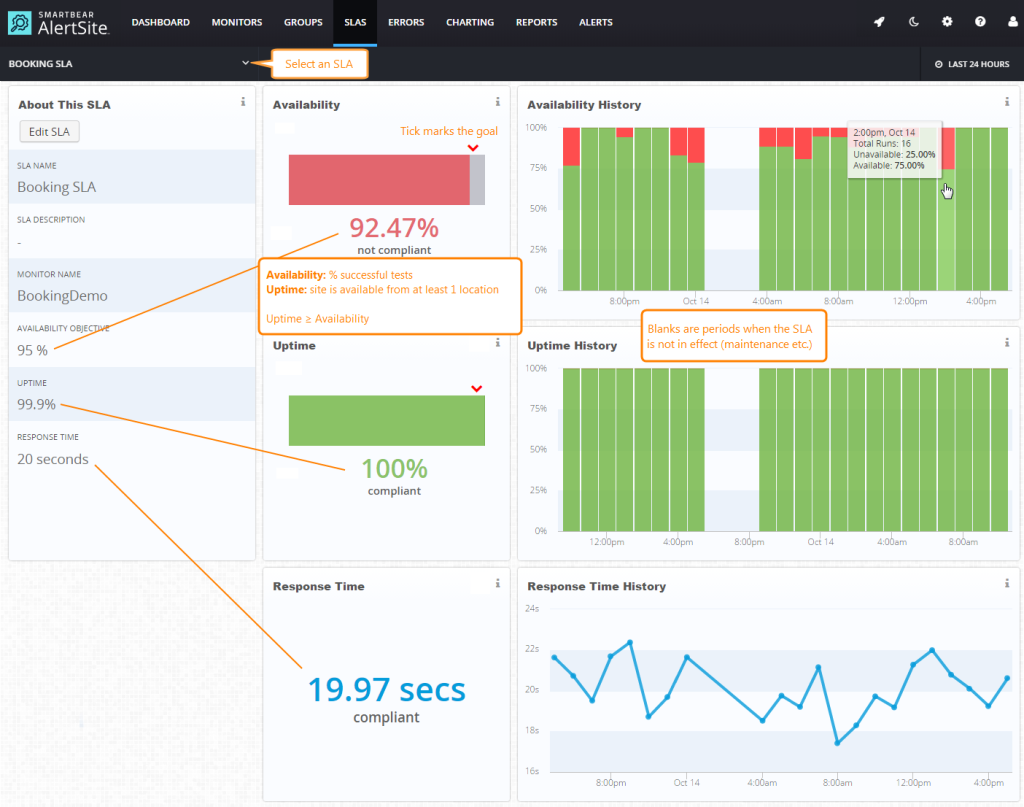
5. Configure Alerts And Triggers
This is where real‑time monitoring becomes proactive instead of passive.
Helpful alerts to configure:
- Wait time alerts
Trigger when a customer waits more than X seconds for the first reply or more than Y seconds between messages. - Keyword alerts
Fire when a customer uses phrases like “cancel,” “refund,” “fraud,” “complaint,” “legal,” or “speak to a manager.” - VIP alerts
Notify a supervisor when a top‑tier customer starts or joins a chat. - Sentiment alerts
If your platform includes sentiment analysis, raise a flag when sentiment drops below a threshold for a certain number of messages.
Keep alerts simple at first and refine over time. Too many pings will train people to ignore them.
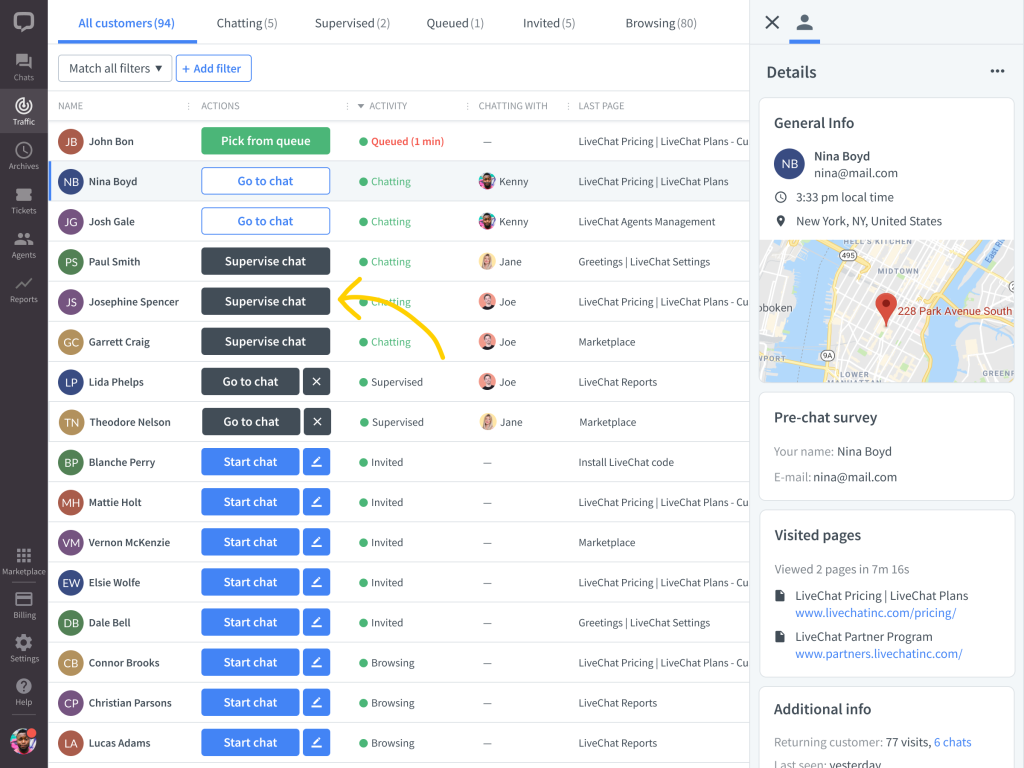
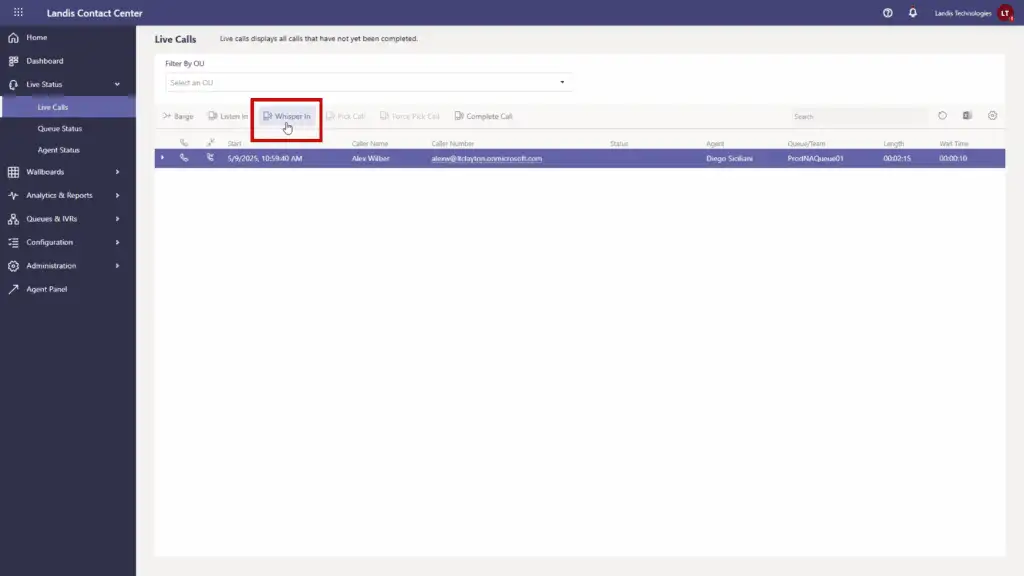
6. Enable Whisper, Join, Or Takeover Options
Most modern chat systems offer some version of these tools:
- Whisper
Supervisors send a private message to the agent within the chat interface. The customer never sees it. This is perfect for coaching without disrupting the conversation. - Join
Supervisor appears as a second participant. The customer can see both names and responses. Useful for complex issues. - Take over
Supervisor fully takes control of the chat when an agent is overwhelmed or the issue is critical.
Decide when each is appropriate, and write simple guidelines for your team. For example:
- Use whisper for coaching.
- Use join when introducing a specialist.
- Use takeover when compliance, safety, or high‑value deals are involved.
7. Standardize Tagging And Notes
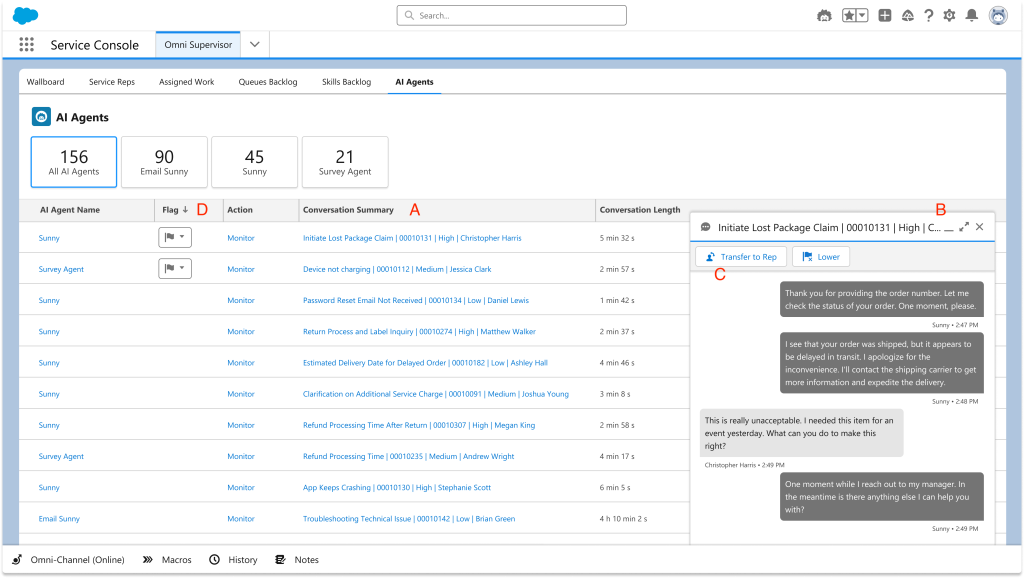
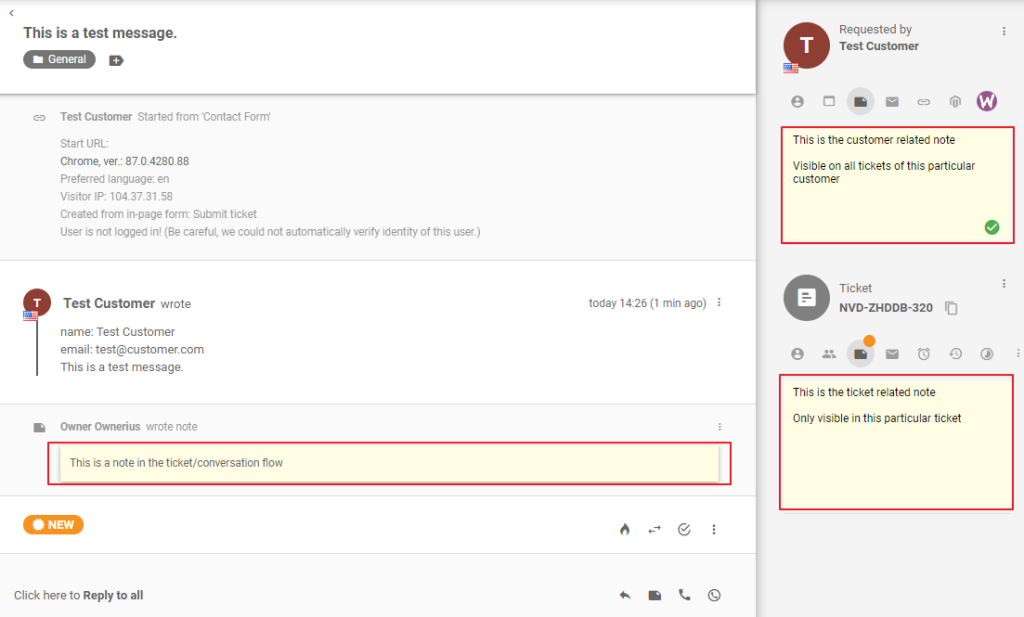
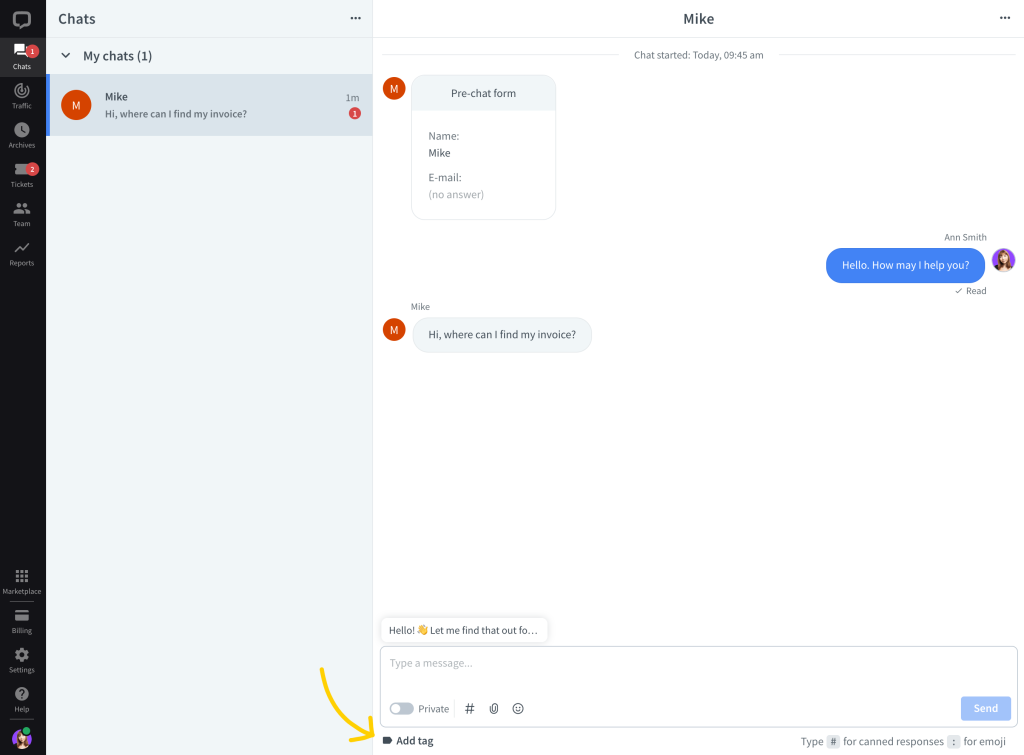
Real‑time monitoring is easier when you can quickly categorize what you see. Work with your team to define:
- A short list of tags (billing, bug, shipping, onboarding, upgrade, churn risk, etc.)
- A quick note format (for example: Issue, Action, Outcome)
Encourage agents to tag conversations in real time. This helps supervisors jump into the right chats and later analyze trends.
Best Practices For Ethical And Effective Monitoring
Real‑time monitoring can get messy if you do not set expectations clearly. Here is how to do it the right way.
Be Transparent With Your Team
Tell your agents plainly:
- That chats can be monitored in real time
- Why you are monitoring (coaching, quality, customer protection)
- How feedback will be used
This builds trust. Monitoring should feel like support, not surveillance.
Avoid Micromanaging Every Chat
Supervisors should not hover over every conversation. Instead, focus on:
- New hires
- High‑risk topics (billing, cancellations, legal)
- Outliers in metrics (high handle time, low CSAT, many transfers)
Trust experienced agents to handle routine queries on their own.
Balance Speed With Quality
Real‑time monitoring often focuses on speed, but quality matters more. Encourage agents to:
- Take an extra moment to read the customer’s full message
- Confirm understanding
- Summarize the resolution at the end
Use monitoring to catch rushed, low‑quality replies just as much as slow ones.
Protect Privacy And Compliance
If you operate in regulated environments, build safeguards into your process:
- Limit who can see full transcripts
- Mask sensitive data like card numbers or identification details
- Attach disclaimers or scripts where legally required
- Train supervisors to handle escalations appropriately
Monitoring should reduce risk, not increase it.
Using Real‑Time Monitoring For Coaching And Training
One of the biggest benefits of monitoring is how much it improves your coaching and onboarding.
Here are simple ways to use it:
- Live shadowing for new hires
Have new agents handle low‑risk chats while a senior rep watches and whispers suggestions. - Clip and share great moments
Save snippets of excellent replies or tricky situations handled well. Use them in team training. - Spot patterns in real time
If you see multiple agents stumbling over the same question, it is a sign your help center article or macro needs an update. - Turn real chats into role‑plays
Take anonymized transcripts and turn them into practice scenarios for new team members.
When agents see monitoring as a growth tool instead of a threat, their performance usually jumps quickly.
Metrics To Watch While You Monitor
Real‑time monitoring goes hand in hand with live metrics. Some of the most useful include:
- First response time (FRT)
How long customers wait for the first human or bot response. - Average handle time (AHT)
How long each conversation stays open, including back‑and‑forth messages. - Concurrency
How many chats each agent is handling at once. - Transfer rate
How often conversations are moved between agents or teams. - Escalation rate
How often a supervisor needs to join or take over. - CSAT / thumb ratings
Customer satisfaction after each chat.
Watch for patterns, such as:
- A specific agent with consistently long handle times
- A certain topic that always seems to require supervisor help
- Spikes in negative ratings during certain hours or days
Use real‑time monitoring to investigate, then refine scripts, macros, or routing rules.
Practical Workflow Example
To make this more concrete, here is what an ideal monitoring workflow might look like on a busy day:
- Supervisor opens the live dashboard
Sees 45 visitors, 9 active chats, and a slightly growing queue. - Alerts start coming in
Two customers have waited more than 60 seconds without a reply. - Supervisor jumps into the queue view
Identifies that one agent is overloaded with 5 chats, while another is free. - Reassigns a conversation
Moves a chat to the free agent and sends a quick whisper with context. - Spots a negative sentiment flag
Opens the flagged chat, reads the last few messages, and whispers to the agent with a suggested apology and resolution. - Joins a high‑value customer chat
A VIP customer mentions “thinking of canceling.” Supervisor joins as a “product specialist” and helps salvage the relationship. - End of shift review
Supervisor tags three interesting transcripts and bookmarks them for next week’s training session.
That entire sequence is powered by real‑time monitoring. Without it, you would not notice most of the issues until the next day, when the opportunity to fix them has already passed.
Common Mistakes To Avoid
When teams first roll out monitoring, they often stumble in a few predictable ways:
- Watching everything but acting on nothing
Monitoring without clear triggers or actions just wastes time. Define what you will do when certain conditions appear. - Over‑engineering alerts
Too many noisy alerts cause alert fatigue. Start with a few high‑impact ones and expand slowly. - Using monitoring only for “gotchas”
If the only time agents hear about monitoring is when they are in trouble, they will resent it. Use it to highlight wins too. - Ignoring agent feedback
Ask agents what views or tools would help them. They are closest to the chat experience. - Forgetting to revisit rules
As your products, scripts, and team change, revisit your triggers, tags, and dashboards every few months.
Wrapping It Up
Real‑time chat monitoring is one of those capabilities that quietly transforms how your support team works.
Used thoughtfully, it:
- Gives you a live pulse on customer sentiment
- Helps supervisors step in at the right moments
- Turns everyday chats into coaching opportunities
- Reduces response times without sacrificing quality
- Protects your brand and your customers
You do not need a huge tech stack to get started. Begin by centralizing your chat channels, setting up a live dashboard, and adding a few smart alerts. From there, layer in whisper coaching, standardized tags, and a simple set of monitoring rules.
The key is to keep it human: be transparent with your team, focus on support rather than surveillance, and use what you see to make the experience better for both agents and customers.
When you get that balance right, monitoring chat conversations in real time stops feeling like “extra work” and becomes the backbone of a faster, smarter, and more empathetic support operation.



Leave a Comment