So you’re ready to start taking money from people on the internet. Congratulations, honestly! Whether you’re launching a side project, a small shop, a freelance service, or a full-blown e-commerce store — getting paid online is the part where things get real.
And here’s the good news: it’s way easier than it used to be. You don’t need a merchant bank account, a payment terminal, or a developer on retainer. The tools available today let you go from “I have a product” to “I have a checkout page” in an afternoon.
But there are still a few things to figure out — like which payment method actually fits your business, what fees to watch out for, and how to make the checkout experience smooth enough that people don’t bail right before they buy. Let’s walk through it!
First, Decide What You’re Actually Selling
This sounds obvious, but your payment setup really does depend on what you’re selling — because different products call for different tools.
- Selling physical items? Look for a store setup that naturally collects delivery details, handles regional sales tax automatically, and keeps your inventory counts in sync so you never oversell. Full store builders like Shopify or WooCommerce handle this entire workflow out of the box.
- Selling services or freelance work? You can keep it simple — a payment link, an invoice, or a booking page with payment built in. You don’t need a full store.
- Selling digital products? Think ebooks, templates, courses, software. You want something that handles the download or access delivery automatically after payment goes through. Nobody wants to manually email download links at midnight.
- Selling subscriptions? Recurring billing adds a layer — you need a processor that handles retry logic, dunning, and upgrade/downgrade flows.
Getting this clear upfront saves you from setting up the wrong thing and having to migrate later!
The Three Simple Pieces You Need
Strip away the fintech buzzwords, and taking payments really just boils down to three parts:
First, you need a payment processor. That’s the engine working behind the curtain to securely charge your buyer’s card and route the funds over. Think of names like Stripe, PayPal, or Square.
Second, you need a place for folks to type in their card numbers. That could be a sleek hosted webpage, a small box right on your site, or even a quick payment link you paste into an email or DM!
Third, you just need a standard business or personal checking account where your payouts can land. Most gateways transfer your earnings over automatically every couple of days.
That’s all there is to it! Modern platforms bundle these pieces into a single login, so you never have to mess with complicated merchant wiring.
Which Payment Methods Should You Offer?
Here’s the thing — not everyone pays the same way! And customers abandoning checkout because their preferred payment method isn’t available is one of the most unnecessary revenue leaks in e-commerce.
According to Baymard Institute research on checkout abandonment, the preferred payment method not being available is one of the top reasons customers leave checkout without completing a purchase. So it’s worth thinking about this early.
- Credit and debit cards are table stakes. You need these, always.
- Digital wallets — Apple Pay, Google Pay, PayPal — are increasingly how people pay on mobile. If you’re not offering at least one of these, you’re losing mobile conversions. These are especially important because they eliminate the need to type in a 16-digit card number on a phone keyboard, which is miserable.
- Buy now, pay later (BNPL) — options like Klarna or Afterpay have exploded in the last few years. For higher-ticket items, offering installment payments increases conversions noticeably.
- Bank transfers and local payment methods — if you’re selling internationally, payment preferences vary a lot by country. What works in the US doesn’t always work in Europe or Southeast Asia.
Most modern payment processors handle a lot of this for you, which is why picking the right processor matters more than you’d think.
Tools That Make This Easy
Stripe — For Businesses That Want Full Control
Stripe is what most serious online businesses end up using sooner or later. It’s the developer-friendly processor that also happens to be genuinely approachable for non-technical founders.

The core product is clean: create an account, get a payment link or embed a checkout form on your site, and start collecting payments in a few hours. No monthly fees — just a straightforward per-transaction rate of 2.9% plus 30 cents for most card transactions.
What really sets Stripe apart is how easily it grows with you. When you eventually want to launch recurring memberships, send PDF invoices, auto-calculate sales tax, or guard against fraudulent charges, you just flip a toggle inside your dashboard. Plus, almost every website builder on earth plugs straight into Stripe in about two clicks.
According to Statista’s data on global digital payment transaction values, digital payment volumes continue to grow at double-digit rates year over year. And Stripe has been built to handle that scale, which is why it processes payments for businesses from solo freelancers all the way up to publicly traded companies.
PayPal — For the Audience That Already Trusts It
PayPal has something Stripe doesn’t: 400 million active account holders who already have their payment details saved and their trust already established.
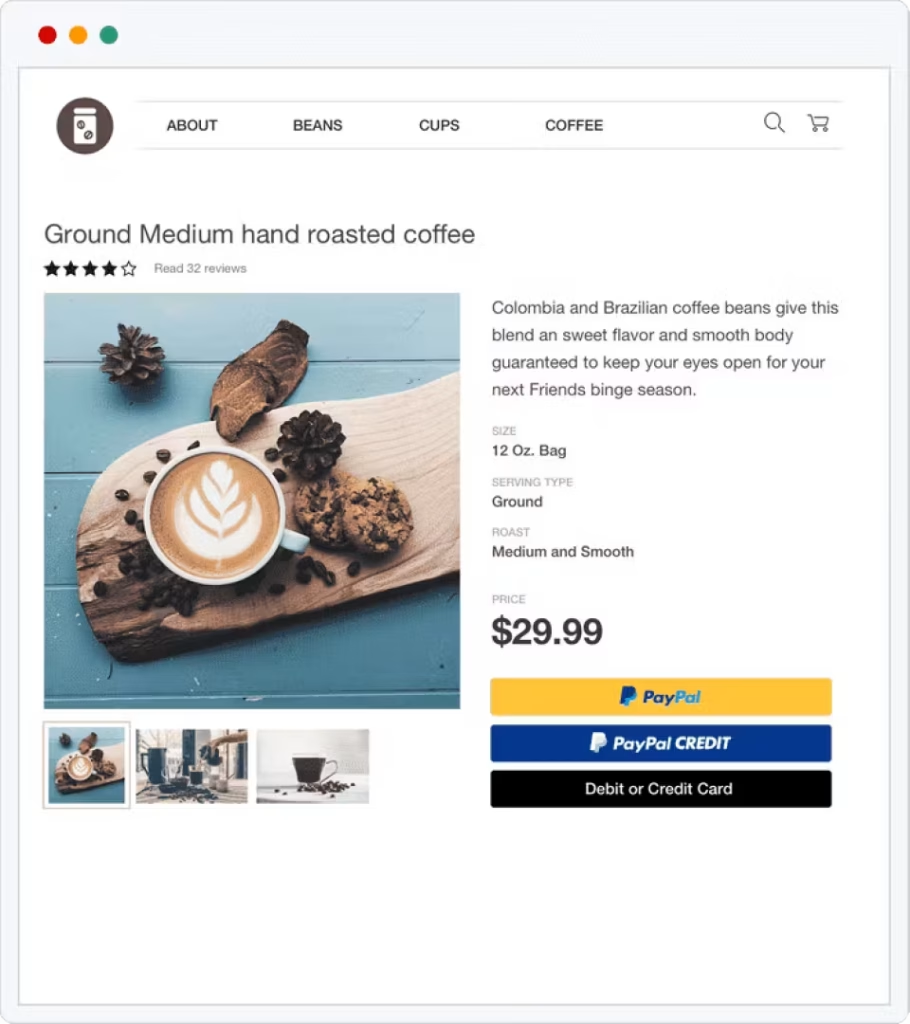
For a lot of buyers — especially older demographics and international customers — seeing PayPal at checkout is a green light. They know it, they trust it, and they’re significantly more likely to complete the purchase than if they have to enter fresh card details into an unfamiliar checkout form.
PayPal is also ridiculously easy to set up. Add a PayPal button to your site or share a payment link, and you’re done. The fees are slightly higher than Stripe for some transaction types, and the account holds and dispute resolution can occasionally be frustrating — but for reaching customers who prefer PayPal, there’s no real substitute.
The smart move for most businesses is to offer both Stripe and PayPal. Use Stripe as your primary checkout, and add PayPal as an additional option. Conversion rates reliably improve when both are available.
Square — For Businesses Selling Both Online and In Person
Square is the tool that shines when your business doesn’t exist exclusively online. If you run a market stall, a café, a salon, or a retail shop alongside your website, Square unifies everything — one system for in-person card readers, online checkout, invoices, and appointments.
The online payment side is genuinely solid. Square’s hosted payment pages are clean and mobile-optimized, the free plan includes online payments with no monthly fee, and the inventory sync between your physical and online stock is a feature most pure-play payment processors don’t offer.
For service businesses that book appointments and take deposits, Square’s booking and payment combination is particularly well-suited — customers can book a time slot and pay upfront or leave a deposit, all in one flow.
Lemon Squeezy — For Digital Product Creators
If you’re selling digital products — software, fonts, templates, courses, ebooks, SaaS subscriptions — Lemon Squeezy handles something most generic payment processors don’t: merchant of record status.
That means Lemon Squeezy takes on the legal and tax responsibility for your sales globally. They handle VAT in the EU, GST in Australia, sales tax across US states — all the compliance that turns into a serious headache the moment you start selling internationally. You don’t file separate tax returns in 40 jurisdictions. They do it for you.
On top of that, Lemon Squeezy delivers the digital product, manages license keys for software, handles subscription upgrades and downgrades, and provides a clean customer portal. For indie developers and content creators who want to sell globally without hiring an accountant, this is the most frictionless setup available.
What to Know About Fees
Every payment processor takes a cut. Here’s what’s typical:
- Standard domestic cards: Most platforms take around 2.9% plus 30 cents whenever someone swipes or types in a card. As your sales grow into serious monthly volume, you can usually negotiate lower custom rates.
- Overseas buyers: When a customer pays using a card issued outside your home country, processors typically tack on an extra 1% to 1.5% for foreign currency exchange and cross-border handling.
- Disputes and payment fights: When a customer disputes a transaction with their credit card company rather than reaching out to you directly, processors hit you with a dispute penalty of around USD 15. Keeping these rare is vital, since exceeding a 1% dispute ratio can lead payment networks to freeze your account.
- Getting your cash: Standard payouts usually hit your bank account within one or two business days. Both Stripe and Square also give you an instant payout option for a tiny extra fee if you need cash flow immediately!
Making Checkout Actually Convert
Picking the right processor is one part of the equation. The other part is the checkout experience itself. And the checkout experience has a massive impact on whether a sale completes or gets abandoned.
Trim down your form fields ruthlessly. If you don’t need a phone number or company name to deliver the order, delete the box! Name, email address, and card details are plenty for most sales.
Always let buyers check out as guests. Forcing someone to invent a new password before they hand you money is a surefire way to lose a sale. Let them pay easily first, and then give them the option to save an account on the confirmation page.
Put obvious trust marks right where people enter their numbers. Little visual cues—like clean Visa and Mastercard logos, an SSL lock icon, or a friendly “256-bit encrypted checkout” note—reassure hesitant first-time shoppers that their card info is completely safe with you.
Optimize for mobile. A significant and growing majority of online purchases happen on phones. If your checkout doesn’t work cleanly on a 375px screen, you’re losing a substantial portion of your potential revenue.
Conclusion
Getting set up to accept online payments is genuinely one of the more satisfying steps in building a business online — because it makes everything feel real. The good tools available today handle the complexity, and you can get started without a technical background, a legal team, or more than an afternoon of setup time.
Know your product type, pick a processor that fits your use case, offer the payment methods your customers actually use, and keep your checkout as frictionless as possible. Everything after that is just refinement.


Leave a Comment