Password managers are one of those tools that almost everyone agrees are a slam-skunk good idea. They help people spin up uncrackable credentials, stash them safely, and kill off the awful habit of using “Password123” for everything. Yet, step into any average corporate office, and you’ll find that employee adoption is dragging. It’s sluggish.
Let’s look at what the password manager adoption rate statistics are actually telling us, pull back the curtain on why your team is quietly resisting the software you pay for, and figure out how to track true usage without annoying everyone into submission.
Why Password Manager Adoption Matters at Work
Let’s be honest: your IT department isn’t struggling with software code; they’re struggling with human psychology.
In a typical modern office, the average employee balances dozens of unique business logins. They have email dashboards, project monitors, HR portals, databases, and third-party tools. Expecting someone to memorize fifty distinct corporate combinations is a fantasy. When faced with that overwhelming cognitive load, humans take the path of least resistance.
They take dangerous shortcuts. Stop pretending it isn’t happening. Right now, your staff is likely:
- Reusing a single baseline password across ten different business accounts.
- Letting standard browsers store highly sensitive access codes.
- Writing down root login keys on neon sticky notes stuck directly to their monitors. It happens.
- Dropping plain-text master spreadsheets into random shared corporate drives.
- Slacking credentials directly to a colleague because they need quick access to an analytics account.
These behaviors turn a minor digital breach into an enterprise-wide disaster. If one soft target leaks, attackers use automated scripts to try that exact combination everywhere else. Tools like a secure vault exist to intercept this risk, but that protection vanishes entirely if your team refuses to open the app.
What the Adoption Statistics Say (And What They Hint At)
A lot of security leaders operate under the assumption that password vaults are already widely integrated into modern culture. The data paints a completely different picture. Growth is happening, sure, but it is moving at a snail’s pace.
Personal Habits Ruin Workplace Rules
According to major industry benchmarks, roughly 36% of American adults use dedicated password managers for their personal lives. That means nearly two-to-one majorities ignore them completely, relying instead on memory or basic browser autofill. This matters because personal habits bleed directly into business behaviors. If an employee won’t use a vault to protect their personal bank accounts, they aren’t going to magically love using one to log into your workplace database.
The Power of a Blunt Mandate
The numbers tell a fascinating story about voluntary rollouts. When organizations leave usage up to individual choice, adoption flatlines at roughly 36%. However, inside organizations with active, supported company mandates, that number skyrockets to 79%. The takeaway is clear: waiting around for employees to voluntarily upgrade their personal habits is a losing strategy.
Wasted Budgets and Secret Defiance
Simply buying licenses won’t save you. Look at a famous research study tracking local government employees: despite the organization purchasing enterprise password vaults for the entire staff, a microscopic 5% of employees actually opened and used them. The rest of the budget evaporated into thin air. This is a classic behavioral bottleneck. If a tool feels like a roadblock, workers will circumvent it.
The Productivity Tax Myth
A massive chunk of corporate workers genuinely believe strict data rules hurt their daily productivity. When software feels tedious, people get creative to bypass it. They run back to insecure storage methods because they are trying to get their actual jobs done, viewing complex security protocols as an intrusive hassle. This explains the quiet pushback against standard enterprise platforms like LastPass or Bitwarden. It isn’t that your employees want to get hacked. They just want to bypass the friction.

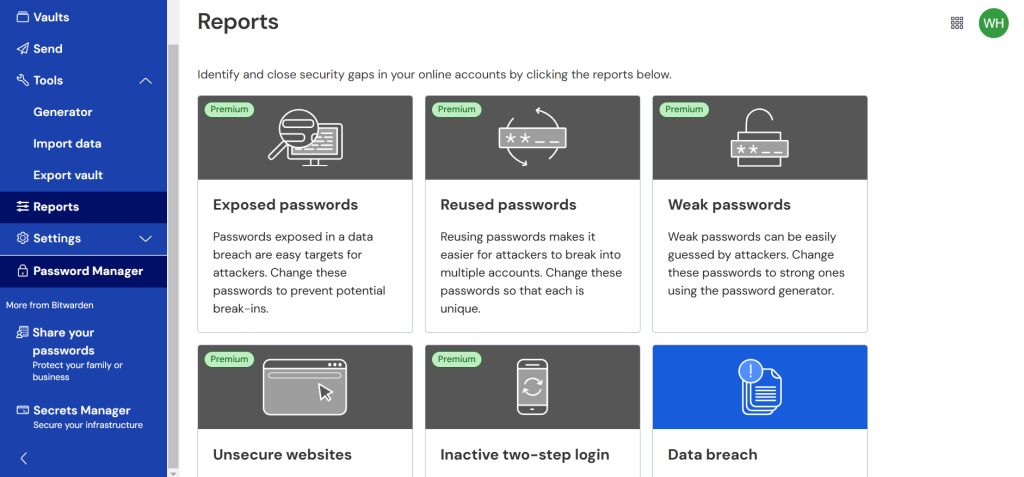
The takeaway: adoption is often not about security beliefs. It is about friction.
Why Employees Avoid Password Managers
If these platforms are designed to protect and simplify our lives, why do teams avoid them like the plague? Here is the real-world friction keeping your numbers low:
- “My system works fine.” Your staff doesn’t see a broken workflow. To them, having their web browser save every credential or keeping a hidden note on their phone feels incredibly fast, familiar, and efficient.
- The single point of failure panic. People are genuinely terrified of the master password concept. They lose sleep wondering what happens if they forget that one crucial code, if the cloud system goes down completely, or if the internal tech team can spy on their personal logins. Even when those fears are completely inaccurate, the anxiety is real enough to paralyze adoption.
- Rollout chaos. A messy first week will ruin software adoption permanently. If you hand out licenses without clear onboarding guides, fail to help users import their old browser histories, or provide zero guidance on mobile app setup, your employees will throw their hands up and ignore the tool.
- Leadership hypocrisy. If the C-suite continues to text passwords to assistants or bypass multi-factor authentication because they’re “too busy,” the rest of the company notices instantly. The unwritten rule becomes obvious: this tool is optional.
- Scare-tactic training fatigue. Most security training sounds like an aggressive lecture filled with threats, shame, and worst-case scenarios. People tune out defensive noise. They respond far better to immediate, selfish wins, like saving ten minutes a day or never having to go through a manual password reset sequence ever again.
Adoption Rates: The Patterns Behind the Numbers
If you want to move the needle on your internal usage data, you have to look past simple seat licenses. You need to shift from passive ownership to active operational enforcement.
[Basic License Assigned] ➔ [ Loopholes Closed ] ➔ [ Daily Autofill Habit ]
(Microscopic Use) (No Browser Saves) (Mature Security)
First, you have to systematically eliminate the alternative exits. As noted in comprehensive workplace security reports, roughly half of security professionals state that disabling browser-based credential storage is the single most effective lever to boost official vault adoption. If the browser stops offering to save information, employees are gently funneled into the correct behavior.
Second, skip the big-bang release. Instead of forcing thousands of employees onto a tool simultaneously, execute a phased approach. Start with a single nimble department, iron out the user interface kinks, and let those employees become organic advocates. Over 35% of high-performing IT teams rank phased rollouts as an incredibly effective way to neutralize initial cultural friction. When a colleague says, “Hey, this actually stopped my login headache,” it carries ten times more weight than an automated IT reminder.
Redefining What Success Looks Like
Stop treating “licenses assigned” as a victory metric. That data lies. Real adoption moves through distinct behavioral phases:
Level 1: The Bare Minimum
Employees install the platform because they have to, but they stop there. They store a couple of non-essential accounts but keep their main workflows bound to browser memory or desk sticky notes. If your helpdesk is still flooded with manual reset requests, you are stuck right here.
Level 2: The Daily Routine
Your team actively relies on autofill. They generate high-complexity combinations for new apps and use platforms like 1Password or Dashlane across both desktop and mobile devices. Shared team accounts get pushed into encrypted organizational vaults rather than vulnerable chat windows.
Level 3: Organic Security Culture
The platform is woven directly into employee onboarding and offboarding. Shared vaults use granular, role-based access tokens so departing staff lose system access instantly without requiring an emergency password rotation across the entire department. Weak or duplicate entries are actively audited, and the business can confidently plan transitions toward advanced options like Nordpass or passkey architectures.
Quick Wins to Boost Your Numbers Next Week
- Run a 10-Minute Lunch-and-Learn: Do not lecture them on corporate risk. Sit down and physically show them how to import their browser credentials in sixty seconds flat.
- Permit Personal Vaults: Let your staff create a separate, private folder inside the app for their personal accounts. If they learn to love using it for their personal streaming or banking profiles, they will naturally use it for corporate tools too.
- Kill the Corporate Jargon: Rewrite your deployment emails. Change “Per company directive, we are leveraging new security software to optimize data protection protocols” to something human: “Here is a tool that means you will never have to type a login or click ‘Forgot Password’ again. Let’s get it set up.”
Wrap Up
Passwords aren’t dying anytime soon. Even with the rise of modern authentication models, the reality is that legacy networks, external vendor portals, and shared departmental profiles will keep traditional logins alive for years.
Buying the software is easy. Changing human behavior is the hard part. If you treat your security rollout like a strict corporate mandate, your adoption rates will flatline. But if you present it as a genuine quality-of-life upgrade that removes friction from their day, your team won’t just adopt it—they’ll actually thank you for it.


Leave a Comment